
Rapsodo MLM2PRO Review (2026): Is It Worth It?

Rapsodo MLM2PRO Review (2026): Is It Worth It?
If you are planning a home simulator under $1,000, this Rapsodo MLM2PRO review covers the exact trade-offs you need to know before buying. While this monitor excels at iron and wedge practice, its inconsistent driver spin is a known weakness. This guide breaks down that driver reality, actual room depth requirements, the three-year total cost of ownership, and the GSPro software setup.
Here is the accuracy breakdown, starting with irons.
Rapsodo MLM2PRO Accuracy: Iron and Wedge Performance
Any honest Rapsodo MLM2PRO review must start with the core capability that makes or breaks an indoor setup: iron and wedge accuracy. Most home simulator buyers use their setups for wedge gapping and mid-iron swing changes. If your launch monitor spits out random, nice-looking numbers that drift from session to session, your practice is a waste of time. For a home build, accuracy means numbers you can trust to transition directly to the course.
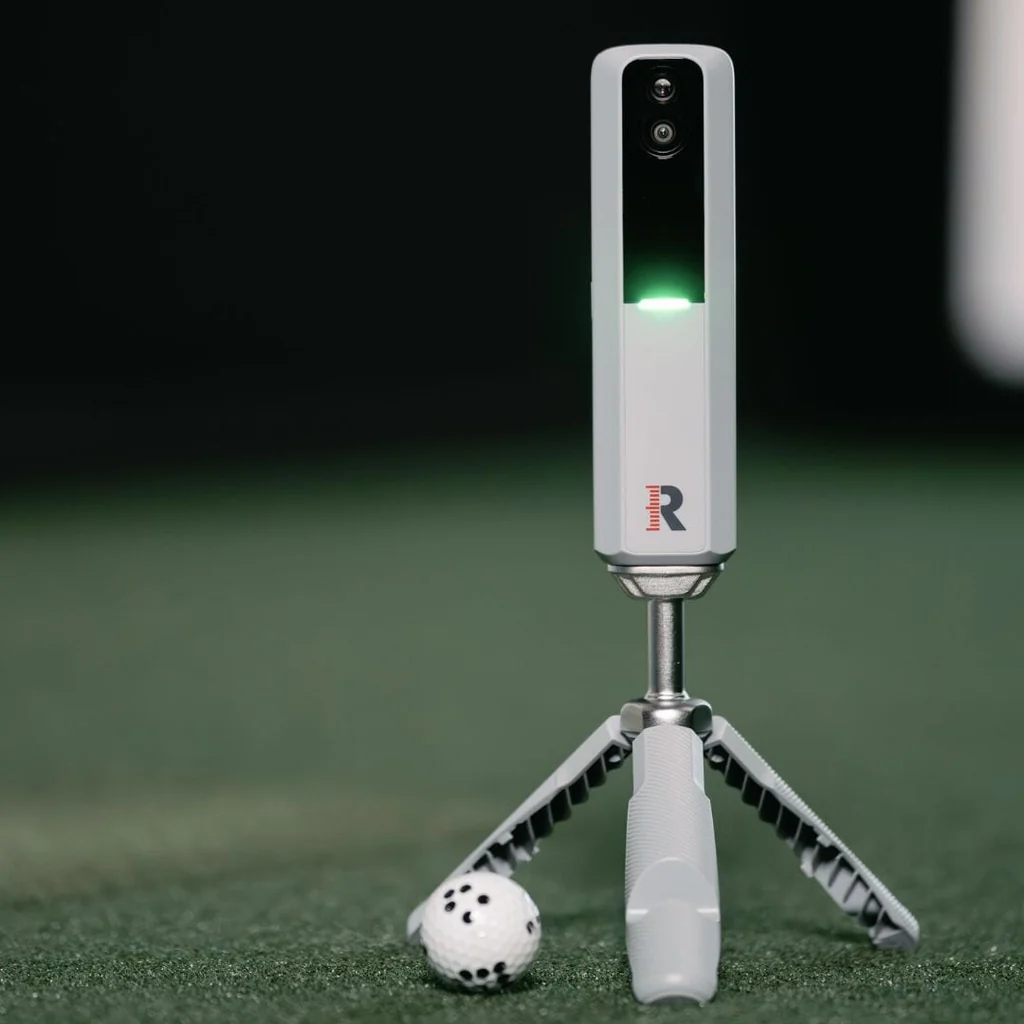
The MLM2PRO achieves this through a hybrid tracking system that combines a radar sensor with two built-in cameras. This dual-technology approach is highly effective for high-loft, short-flight shots where radar-only units typically struggle in tight indoor spaces. The high-speed impact camera captures the ball immediately at launch, while the radar tracks its flight. This dual-source processing delivers highly consistent ball speed, launch angle, launch direction, and carry data.
There is a major caveat regarding spin and spin axis. To get true, measured spin indoors, you must use the custom Rapsodo Precision Technology (RPT) marked balls. Without them, the device cannot track rotation and instead relies on less reliable algorithmic estimates. While estimated spin works for casual simulation, it will not give you the precise data needed for true gapping, and it can cause shots to render straight when you actually hit a draw or fade.
If you are skeptical, you can easily validate this accuracy at home by hitting 8 to 10 shots with an 8-iron. Do not focus on a single hero shot; look for tight clustering. Compare these carry numbers against your known on-course distances. Finally, check that your visual strike quality on the slow-motion impact video trends with the launch direction on screen, ensuring the data matches your physical feel.
For irons and wedges, this is one of the safest buys under $1,000 if you accept the RPT ball requirement for best spin. It is the ideal setup for players who care about gapping and directional control more than exact driver spin optimization.
Rapsodo MLM2PRO Driver Accuracy: The Major Tradeoff
The blunt truth is that driver accuracy is the Rapsodo MLM2PRO’s documented weak point relative to its stellar iron performance. If you are reading this Rapsodo MLM2PRO review hoping to build a driver-optimization studio, you need to understand this tradeoff before buying.
For most buyers, driver problems show up in three distinct ways. First, you will see significantly more shot-to-shot variance than you do with irons. Second, spin and spin axis numbers look suspicious, often under-reading backspin by 1,000 RPM or more. In the simulator, this turns what should be a ballooning slice into a passable fade. Finally, shot shapes can be flat-out wrong, rendering a push-fade as a straight push or even a hook on the screen.
These issues stem from a mix of device limits and room constraints. High driver ball speeds demand faster processing and a longer tracking window, meaning tiny alignment errors are instantly amplified. Indoors, tight spaces cause players to make flat, tentative swings that alter actual club delivery. Additionally, radar units are highly sensitive to garage interference. Nearby metal garage doors, concrete floors, and tools create signal reflections that confuse the Doppler sensor during high-speed swings.
Before you blame the unit itself, run through this self-diagnose checklist to isolate setup issues from device limitations:
- Check ball flight: Confirm you have at least 8 to 10 feet of clear ball flight from tee to screen.
- Check alignment: Re-level the unit, verify it sits at the same height as the hitting mat, and lock a repeatable stand position.
- Check the ball: Always use the marked RPT balls when judging spin, as unmarked balls force the system to estimate.
- Check averages: Validate your data with 10-shot averages rather than reacting to one or two errant swings.
The bottom line is simple. If your main goal is dialing driver spin within a few hundred RPM, this is not the monitor to buy first. This setup ultimately breaks for high-speed players, driver-optimizer tinkerers, and anyone with a short or low-ceiling room who cannot swing a driver freely.
Rapsodo MLM2PRO Review: Space Requirements & Room Dimensions
If you are planning an indoor build, do not rely on generic "needs room" advice. The Rapsodo MLM2PRO is a radar-camera hybrid, meaning its physical footprint is non-negotiable. Before spending $699 plus the annual $99 subscription, you must verify your space against the actual math.
An indoor setup requires roughly 14 to 16 feet of total depth. The unit must sit 6.5 to 8.5 feet directly behind your ball, and you need at least 8 feet of clear ball flight from the ball to your impact screen or net. If your room has less than 14 feet of total depth, this device will not work.
On day one, placement is critical. The MLM2PRO sits on your target line, meaning leveling and alignment are not optional. A tiny tilt or off-line angle will corrupt your path, angle of attack, and horizontal launch direction. Rapsodo uses a "two box" system in its alignment screen: a larger ball-data zone and a smaller club-data box. If your ball is not sitting precisely in that smaller zone, the device will not capture club metrics.
You must also account for indoor interference. In a garage, metal garage doors, overhead tracks, and metal storage racks can create signal reflections that cause erratic radar readings. On the camera side, poor lighting or high visual clutter behind the hitting area can prevent the high-speed lens from tracking the ball correctly.
To minimize setup frustration, use three practical build tips:
- Use a leveling stand: Buy or 3D-print a dedicated base to ensure the device is perfectly level with your hitting mat every time.
- Mark your mat: Tape a small dot on your hitting mat to mark the exact spot where the ball sits in the club-data zone.
- Run a sanity check: Hit a few shots with a familiar club, like your 7-iron, at the start of every session to ensure carry distances look normal.
The MLM2PRO can be very good indoors, but it is less forgiving of sloppy setup than most first-time buyers expect. If your space is too tight for these measurements, read our guide on minimum golf simulator room dimensions to find a more compact camera-only option.
Software and Setup: Connecting the MLM2PRO to GSPro
No Rapsodo MLM2PRO review is complete without addressing the integration process with third-party software. The biggest surprise for first-time buyers is how much effort it takes to get this unit talking to third-party platforms. Before buying, you must decide on your software path. If you want to play GSPro or E6 Connect, you cannot just plug in a cable.
You must subscribe to Rapsodo's $99 per year Simulator membership tier and own a gaming PC that meets the required graphics standards. E6 Connect follows a similar third-party pathway and assumes you have the right device and account tier.
Connecting the device to GSPro requires a specific sequence:
- Connect the MLM2PRO to your phone or tablet using the native Rapsodo app.
- Navigate to Play, select Third-party apps, and tap GSPro to generate your connection token.
- Open the MLM2PRO connector software on your PC, paste the token, and launch GSPro.
- Keep the connector window running in the background during play. If you close it, your game stops instantly.
This multi-step connection process is prone to several common failure modes:
- Connector window closure: If shots stop registering, the window likely closed or lost authentication.
- Wi-Fi instability: If connection drops, separate your router into distinct 2.4 GHz and 5 GHz SSIDs, and force both devices onto the same band.
- Authentication loops: The software frequently requires you to re-authenticate, which can trigger frustrating login loops.
Once connected, expect a slight shot delay. A 1 to 2-second lag between impact and the ball flight on your screen is normal. If you experience longer delays, the issue is typically local network congestion or an underpowered PC, not the hardware itself.
If you are comparing other devices in this price tier, our MLM2PRO vs R10 comparison and MLM2PRO vs SkyTrak+ comparison show how different hardware handles these connection steps.
Ultimately, the MLM2PRO can run GSPro, but it is not the plug-and-play experience most buyers expect. If you hate network troubleshooting, be prepared to spend time dialing in your connection or consider a device with native PC integration.
Rapsodo MLM2PRO Review: The 3-Year Cost Reality
If you think buying the Rapsodo MLM2PRO is a simple $699 decision, you are setting yourself up for a budget surprise. This system is built around a recurring software and accessory ecosystem. To help you plan, here is the honest three-year total cost of ownership (TCO) calculated for early 2026.
| Cost Item | 3-Year Cost | Details |
|---|---|---|
| MLM2PRO Hardware | $699 | Upfront purchase price |
| Simulator Subscription | $297 | $99/year for third-party software access |
| RPT Marked Balls | $130 | 2 dozen at $65/dozen (wear replacement) |
| Leveling Stand | $40 | Essential for consistent setup height |
| Base System Total | $1,166 | Excludes simulator software and PC |
| *Optional: Gaming PC* | *$1,000* | *Required for GSPro (GPU is the bottleneck)* |
The recurring subscription is the first major hurdle. Without the $99 per year Simulator tier, you lose access to third-party integrations like GSPro and E6 Connect, advanced spin metrics, and impact video. Any practical Rapsodo MLM2PRO review must emphasize that these key simulation features are gated behind an annual paywall. Note that subscription tier names and pricing can change over time.
Then you have the RPT balls. To get true spin and spin axis data indoors, you must use these custom marked balls, which retail between $60 and $75 per dozen. Impact screens and enclosure nets act like sandpaper. Over time, high-speed screen hits and dot abrasion wear down the printed patterns, forcing regular replacements to maintain accurate readings.
Compared to the Garmin R10, this setup carries a higher long-term cost. The R10 is cheaper upfront at $599 and does not require custom balls, but it relies on estimated spin indoors. The MLM2PRO gives you actual measured spin, but you pay a premium over time for that accuracy.
If you want a system that lasts three years and you care about indoor spin, you must budget for the subscription and ongoing ball replenishment. If those recurring costs feel like a dealbreaker, do not buy it. For a complete breakdown of alternative options, check our guide on the best golf simulator under $1,000 to find a setup that fits your budget without the surprise fees.
Rapsodo MLM2PRO Portability and Setup Reality
Taking a launch monitor to the range sounds ideal, but the real test of any unit in this Rapsodo MLM2PRO review is how much friction you face before hitting your first shot. While the hardware is exceptionally portable, the gap between portable and repeatable is wider than most buyers expect. Daily setup requires more precision than a simple drop-and-go device.
The built-in battery lasts roughly three to four hours in real-world conditions. That is plenty for a range session, but you will want it plugged in for extended indoor simulator play. The included hard-sided carry case is highly functional. It clips directly to your bag and holds the unit, tripod, and charging cable securely.
The real bottleneck is repeatability. Shuttling the unit between the range and your garage makes setup a recurring chore. Because this is a camera-radar hybrid, tiny alignment errors yield major data discrepancies. Placing the unit two inches off-center or failing to get it level with your hitting mat will immediately skew horizontal launch angles and club path metrics.
There are also logistics and durability realities to manage. The printed dots on the custom RPT balls wear down quickly against impact screens, making them a recurring consumable expense. You also cannot retrieve these balls at a public range, meaning you must accept estimated spin outdoors. The included plastic tripod is lightweight and easily disturbed by wind, prompting many users to upgrade to heavier aftermarket leveling bases.
To minimize daily friction, keep a small kit with a portable power bank, an alignment stick, and your charger. Indoors, use painter's tape to mark the exact floor positions of the tripod legs. This simple step ensures your transition back to indoor simulator mode takes seconds rather than minutes.
If you want one device for the range and home, the MLM2PRO is a highly competitive value. If you hate fiddly setups, however, you will feel the physical friction. Ultimately, portable versatility and indoor performance both depend on a stable physical placement and a reliable network connection.
The Verdict: Rapsodo MLM2PRO Review
The Rapsodo MLM2PRO is a highly capable budget launch monitor, but it is not a universal fit for every home setup. It stands as a top recommendation if you prioritize iron-focused indoor practice, wedge gapping, and high-speed video feedback. However, driver accuracy is the main compromise, as the device struggles to measure high-speed wood spin consistently. If you have the room depth for a radar unit and want to dial in your irons, it is a premier value under $1,000.
| Category | Judgment | Quick Take |
|---|---|---|
| Accuracy (Irons) | Excellent | Highly reliable carry and launch data indoors when using RPT marked balls. |
| Accuracy (Driver) | Mediocre | Struggles with high-speed spin axis, often under-reading driver backspin. |
| Value | Good | Unmatched features at $699, but the three-year cost climbs above $1,100. |
| Software Integration | Fair | Runs GSPro and E6 Connect, but the connection process requires network patience. |
| Portability | Excellent | Compact, lightweight, and comes with a quality case for easy range travel. |
| Indoor Performance | Strong | Performs beautifully in quiet rooms, though sensitive to garage radar interference. |
Buy It If...
- Your priority is iron practice. This is the best value option under $1,000 for gapping, wedge work, and reviewing slow-motion impact video.
- You accept the cost of RPT balls. You are willing to hit marked balls indoors for actual spin data and pay to replace them as the dots wear down.
- Your room has the depth. You have at least 14 to 16 feet of total room depth to give the radar sensor adequate tracking space.
- You are comfortable with network setups. You do not mind occasional troubleshooting, using a PC connector, or managing Wi-Fi bands to play GSPro.
Look Elsewhere If...
- Driver optimization is your main goal. High-speed driver shots reveal the limits of this hardware, leading to inconsistent spin and flat shapes on screen.
- Your space is tight. If a low ceiling or short depth forces you to make tentative swings, a camera-only unit like the SkyTrak+ is a better fit.
- You want plug-and-play simplicity. The connection sequence to third-party software requires extra steps that can test your patience.
- You hate ongoing costs. If annual software fees and expensive replacement balls feel like a dealbreaker, this ecosystem is not for you.
If you are still weighing options, the under $1K budget guide compares entry-level choices.
Frequently Asked Questions
Is the Rapsodo MLM2PRO worth it in 2026?
Yes, the Rapsodo MLM2PRO is worth it in 2026 if you focus on iron practice and have the space for a hybrid radar-camera setup.
- Who gets value: Golfers looking for accurate iron data, high-speed impact video, and a budget path to GSPro.
- Who regrets it: Players trying to build a driver-optimization studio or those who dislike recurring subscription costs.
- The non-negotiables: You must have at least 14 feet of room depth and accept that driver spin data has a known weakness.
How accurate is the MLM2PRO indoors?
The MLM2PRO is highly accurate for irons and wedges indoors when using RPT balls, but it has a documented weakness with driver spin. High-speed wood shots often show under-read backspin and incorrect shot shapes. To ensure consistent indoor data, you must maintain a perfectly level setup relative to your hitting mat and use the marked balls to measure true spin instead of relying on algorithms.
Do you need a subscription for MLM2PRO? What does $99/year actually unlock?
Yes, you must pay for a subscription to use the MLM2PRO as a simulator. As of early 2026, the $99 per year Simulator tier is required to unlock integrations with GSPro and E6 Connect, advanced spin metrics, and swing video storage. Note that subscription tier names and pricing are subject to change.
Do I need RPT marked balls? How much do they cost and how long do they last?
Yes, you must use Rapsodo Precision Technology (RPT) marked balls to measure true spin and spin axis indoors. Without them, the device estimates spin data. A dozen RPT balls costs between $60 and $75. Treat them as consumables, as hitting an impact screen wears down the printed dots over several months of heavy use.
How do you connect MLM2PRO to GSPro?
You connect the MLM2PRO to GSPro by authenticating in the mobile app and routing the data to your PC. Generate a connection token under the third-party apps tab in the Rapsodo mobile app, paste it into the MLM2PRO PC connector program, and launch GSPro. If you drop connection, make sure your Wi-Fi is separated into distinct 2.4 GHz and 5 GHz bands.
MLM2PRO vs Garmin R10: which should I buy?
The choice between these two launch monitors comes down to accuracy, space, and ongoing costs.
- Accuracy: The MLM2PRO measures actual indoor spin with RPT balls, while the Garmin R10 estimates it.
- Room Fit: The R10 needs 18 to 20 feet of depth, whereas the MLM2PRO works in 14 to 16 feet.
- Costs: Both require annual subscriptions, but the MLM2PRO carries the added cost of replacement RPT balls.
Read our MLM2PRO vs R10 comparison for the full breakdown of these two devices.
Related Guides
Uneekor EYE XR Review (2026): Overhead Launch Monitor for Home Sims
Read our honest Uneekor EYE XR review covering accuracy, room space requirements, GSPro costs, and whether this overhead launch monitor fits your home setup.
Rapsodo CLMPRO: First Look at the Overhead Six-Camera Launch Monitor
Wondering if the Rapsodo CLMPRO is worth waiting for? Explore confirmed prototype specs, ceiling clearance needs, GSPro compatibility, and ownership costs.
Bushnell LPi Review (2026): Bushnell's New Launch Monitor
Our Bushnell LPi review breaks down accuracy, software fees, and bay setup. Find out if this budget indoor launch monitor is worth the recurring costs.