
Garmin R10 vs Garmin R50: Should You Upgrade?

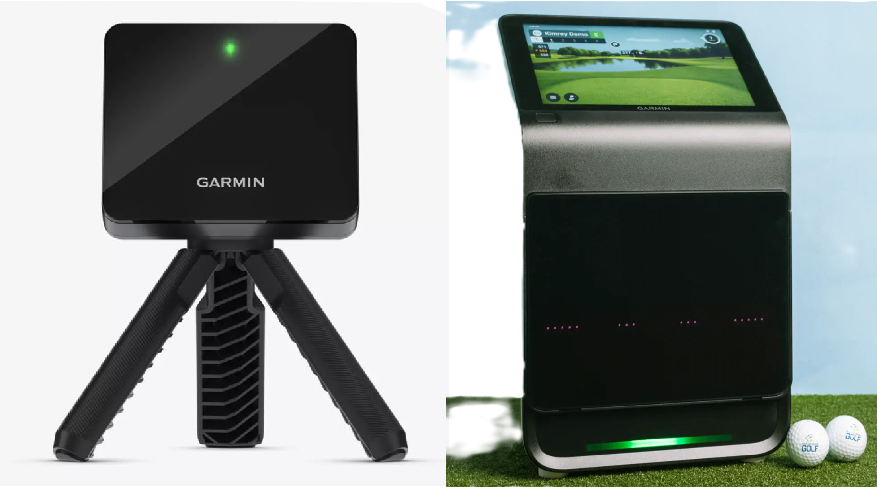
Garmin R10 vs Garmin R50 (2026): Is the Upgrade Worth It?
If you already own an R10, upgrading to the Garmin R10 vs Garmin R50 rarely makes sense unless you need measured spin and club delivery data indoors. If you want a standalone, no-PC simulator experience, the R50 is the cleanest path. This comparison covers accuracy, space, software, and three-year costs. You will see exactly what that price delta buys, and whether to spend it on the monitor or your enclosure.
Garmin R10 vs Garmin R50: Indoor Accuracy and Spin
If your ball flight model is wrong, both your practice feedback and simulator realism are useless. Indoor spin rate and spin axis are where budget radar units get exposed. When the flight model relies on mathematical guesswork, a block slice can look like a straight push on the screen, turning serious practice into frustrating guesswork.
The Garmin R10 relies on Doppler radar placed six to eight feet behind the ball. Indoors, with only a few feet of ball flight to track, the unit cannot directly measure spin. Instead, it estimates spin rate and spin axis. This calculation is why draws can register as straight shots and wedges can balloon with unrealistic carry. To get reliable indoor spin, you must use Titleist RCT balls, which is an ongoing expense and setup hassle.
The Garmin R50 uses a three-camera photometric system that directly measures spin rate and spin axis from the ball's rotation, alongside high-speed impact video. This optical tracking improves driver curvature realism, wedge spin consistency, and overall confidence when tweaking equipment. However, the system is not completely friction-free. Capturing club delivery data requires putting a specialized reflective sticker on your clubface, a workflow that adds setup friction before every session.
The visual precision of the R50 changes how you trust your shot shape indoors, whereas the R10 remains a portable, estimation-based budget tool. If your primary frustration with the R10 is weird curve shapes or untrustworthy driver spin, the Garmin R50 represents a massive accuracy upgrade. However, if your R10 already gives you good enough carry and ball speed numbers to swing in the garage, this accuracy upgrade alone does not justify the massive $4,400 price delta. Read our full Garmin R50 review for a deeper breakdown of its camera limits, data parameters, and setup quirks.
Garmin R10 vs Garmin R50: What the Club Data Price Delta Buys
Upgrading your launch monitor is not about paying for a shinier case. It is about whether the new metrics will actually change your practice decisions on the hitting mat.
At $599, the Garmin R10 offers strong value for basic ball flight. However, its indoor radar-only technology relies on estimation for critical spin data. You will get reliable carry distance and ball speed, but you lose confidence when diagnosing club delivery or spin axis errors.
The $5,000 Garmin R50 justifies its steep price jump by directly measuring 15 ball and club parameters instead of estimating them. This introduces several critical metrics that are absent on the R10:
- Measured spin rate and spin axis: This eliminates the indoor estimation errors common with the R10, which is crucial for accurate shot shaping.
- Club path and club face angle: These metrics tell you exactly why a ball curves, allowing you to work on swing path corrections.
- Angle of attack: This is essential for driver fitting, optimization, and wedge matrix distance control.
- Measured club head speed: This provides an accurate, non-estimated smash factor.
- Impact video: Far from a gimmick, this camera view delivers visual proof of strike location to accelerate face-to-path learning.
- Launch direction and total deviation: Side-mounted cameras read early horizontal launch angles with high accuracy, whereas rear-mounted radars struggle in tight rooms.
There is an honest caveat to this data collection. To capture club path, face angle, and angle of attack, you must apply reflective stickers to your clubfaces. If you swap clubs often or want a quick, grab-and-go range session, this step adds friction.
If your goal is serious equipment gapping, precise wedge work, or path training, the R50 wins. The R10 is the better buy for casual simulator rounds where advanced metrics will not change your actual swing decisions.
Space Requirements and Setup: Garmin R10 vs Garmin R50 Room Fit
The best launch monitor is the one you can actually set up and use. If a device requires tedious calibration or does not physically fit your room, it will collect dust. This makes space your first hard constraint when choosing between the Garmin R10 vs Garmin R50.
The Garmin R10 is a radar unit sitting six to eight feet behind the ball. You need another eight feet of ball flight to the screen, pushing total room depth to a minimum of 14 to 16 feet. By contrast, the Garmin R50 uses a camera system placed beside the ball. Because it requires no rear clearance, it is much friendlier to tight indoor bays.
Daily friction is the next hurdle. The R10 is notoriously sensitive to alignment, where a tiny one-degree mis-aim translates to a massive directional error on your screen. The R50 eliminates alignment hassle but shrinks your hitting zone. When you enable club tracking, you must place the ball precisely in a tight camera field of view to get clean data.
For outdoor use, the R10 is pocket-sized, battery-powered, and easy to throw in a golf bag. The R50 is heavy, bulky, and awkward to transport. While its built-in screen allows outdoor play without a projector, glare and setup weight mean it is not a casual range companion.
Remember that no launch monitor changes physics. If your ceiling is too low to safely swing a driver, no hardware choice can solve that. Make sure to check our GSPro compatibility list to see how your room dimensions align with your software plans.
- Choose the Garmin R50 if you have a tight indoor bay, want a permanent daily setup, and want to avoid radar alignment issues.
- Choose the Garmin R10 if you have 16 feet of depth and want a portable, budget-friendly unit to split time with the outdoor range.
Software and Standalone Play: Garmin R10 vs Garmin R50
Your software dictates your daily course library, visual realism, and long-term costs. You should always choose your software platform first, then buy the hardware that supports it.
The Garmin R50 is a standalone-first machine. With its built-in 10-inch touchscreen and HDMI output, you can play simulation rounds without a PC, iPad, or phone using Garmin Home Tee Hero.
In contrast, the Garmin R10 is entirely app-dependent. It has no built-in screen and requires a smartphone or tablet to run the Garmin Golf app, which costs $99 per year for simulation features. To run external software like GSPro, E6 Connect, or Awesome Golf, you must broadcast the data from your mobile device to a PC or projector.
- Choose the Garmin R50 if your priority is a zero-friction setup where you turn on one machine and immediately play on a built-in screen, and you have the $5,000 budget.
- Stick with the Garmin R10 if you already own it and your main goal is running GSPro on a PC. The software upgrade alone is not worth the $4,400 price jump unless you also want measured club and spin data.
Garmin R10 vs Garmin R50: Which Launch Monitor Should You Buy?
In 2026, comparing the Garmin R10 vs Garmin R50 is less about choosing between two devices from the same brand and more about deciding if you need measured indoor spin and a standalone simulation workflow. The massive price gap separates two entirely different tiers of golf simulation.
Existing R10 Owner Happy with Practice: Keep the R10
If you are already getting decent range sessions out of your R10, keep it. Most of your simulator build quality comes from the hitting bay itself, not just the launch monitor. Keep the R10 and spend the savings on upgrading your enclosure, screen, and hitting mat to improve the overall experience.
Existing R10 Owner Frustrated by Indoor Spin: Upgrade to the R50
If you are tired of estimated spin axis and inaccurate wedge data indoors, the R50 is a worthy upgrade. Only pull the trigger if you will actually use the measured spin and club delivery metrics. If you only play casual virtual rounds, you will not harvest the value of a $5,000 unit.
First-Time Buyer Choosing From Scratch: R50 for Simplicity, R10 for Budget
The R50 is the superior pick if you want a turnkey, standalone experience with zero-friction daily play. If you are on a tight budget and do not mind a device-plus-app workflow, choose the R10. Remember to budget $99 per year for the Garmin simulation subscription or $250 per year for GSPro.
Range-First Portable User: Choose the R10
The R10 remains the king of portability. It is pocket-sized and has an excellent battery life. While the R50 is technically portable, it is bulky, heavy, and too expensive to leave sitting on a dusty driving range tee box.
The Upgrade Math: What Else Can Your Money Buy?
The price delta between these two units is exactly $4,400. That extra cash buys you measured spin, detailed club path metrics, impact video, and a built-in touchscreen.
However, you must consider the opportunity cost. That same $4,400 can completely build out the rest of your simulator bay. Instead of upgrading just the launch monitor, that money can buy a $1,000 gaming PC for GSPro, a $1,500 premium Carl's Place enclosure, a $600 professional-grade TrueStrike hitting mat, and a $1,300 short-throw projector.
Frequently Asked Questions
Should I upgrade from a Garmin R10 to a Garmin R50?
You should only upgrade to the Garmin R50 if you want measured club delivery data, accurate indoor spin rates, or a standalone simulator experience. The R50 measures club path, face angle, and angle of attack, which the R10 cannot do. However, you should stick with the R10 if your current garage setup already satisfies your practice needs, or if you would rather spend the $4,400 price delta on a better screen and hitting mat.
Is the Garmin R50 worth it if I already own an R10?
The Garmin R50 is only worth the investment if the R10's indoor spin estimations are actively hurting your practice. Upgrading costs $4,400 more than the R10. With that same budget, you can buy a dedicated gaming PC, a premium hitting mat, a high-quality enclosure, and a short-throw projector. Upgrading your physical bay components often does more to improve your home simulation experience than buying a more expensive launch monitor.
Does the Garmin R50 work with GSPro and E6 Connect?
Yes, the Garmin R50 supports both GSPro and E6 Connect with native integrations. Unlike the Garmin R10, which requires an unofficial API connection, the R50 connects directly. Keep in mind that running both platforms still requires a capable gaming PC.
How much space do I need for R10 vs R50 indoors?
The Garmin R10 requires at least 14 to 16 feet of room depth, whereas the Garmin R50 can run in 10 to 12 feet of depth. Because the R10 is a radar unit, it must sit 6 to 8 feet behind the ball. The camera-based R50 sits beside the ball, completely removing the need for rear clearance.
Do I need special balls or stickers?
Yes, both units require specific accessories to unlock their full tracking capabilities indoors. The Garmin R10 requires Titleist RCT balls to reliably measure ball spin rates indoors. The Garmin R50 measures ball spin natively, but you must apply reflective stickers to your clubfaces to capture path and face data. This adds a minor recurring cost and setup step before you swing.
If I buy the R50 and only use Home Tee Hero, what do I lose vs GSPro?
If you only use Home Tee Hero, you lose the photorealistic graphics, realistic physics engine, and the library of over 500 courses found on GSPro. Home Tee Hero uses cartoonish, mobile-level graphics. It is designed for players who want a fast, plug-and-play experience without buying a gaming PC.
Related Guides
Best New Launch Monitors of 2026: What Actually Shipped
Discover the best new launch monitors 2026 has to offer. Compare real shipping units by space requirements, 3-year costs, and simulator software compatibility.
BenQ AK700ST vs Optoma GT2400HDR (2026): Best Golf Projector?
Comparing BenQ AK700ST vs Optoma GT2400HDR? Discover throw ratios, 4K vs 1080p clarity, latency, and costs to choose the best golf simulator projector.
Square Golf Omni vs Rapsodo MLM2PRO (2026): Best Budget Pick?
Comparing the Square Golf Omni vs Rapsodo MLM2PRO? Compare indoor accuracy, room depth needs, and 3-year costs to choose the best launch monitor for your sim.