
Rapsodo MLM2PRO vs Garmin R10 (2026 Comparison)

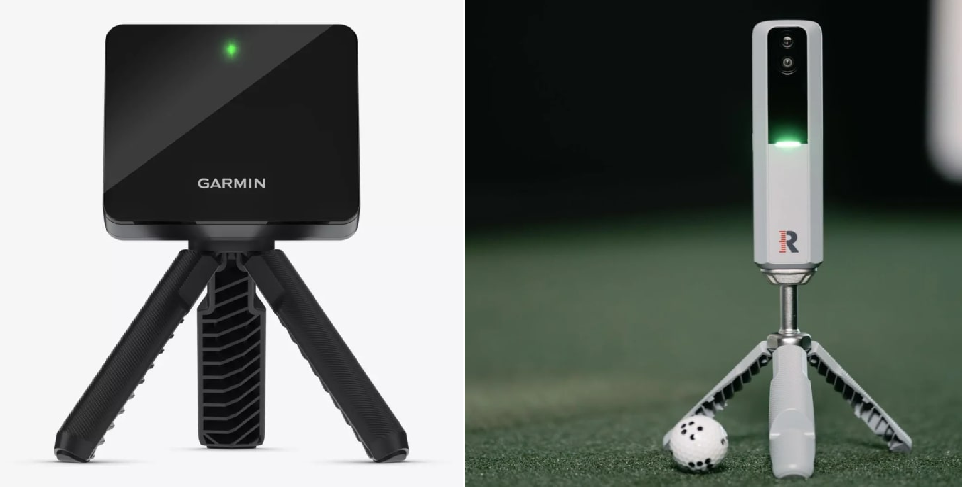
Rapsodo MLM2PRO vs Garmin R10 (2026 Comparison)
The Garmin R10 wins for portability and budget; the Rapsodo MLM2PRO wins for simulation accuracy and spin data. Deciding between the Rapsodo MLM2PRO vs Garmin R10 means choosing between two sub-$1,000 monitors for indoor practice. Neither is perfect indoors, and both get expensive once you add subscription fees and specialized balls. This guide compares accuracy, indoor space interference, software compatibility, and three-year costs.
Start with accuracy and spin because that is what makes sim golf feel real.
Indoor Accuracy: Measured vs. Estimated Spin
When evaluating the Rapsodo MLM2PRO vs Garmin R10 for an indoor simulator, accuracy comes down to how each device handles spin. Indoors, you spend most of your time hitting wedges and irons into a screen. If your spin data is inaccurate, your wedge carry windows become noisy and your simulated ball flight stops matching your real-world shot shape.
The Rapsodo MLM2PRO solves this with a camera and radar hybrid design. By using its optical sensor, it directly measures ball spin rather than guessing, though you must use the marked Rapsodo RPT balls to unlock these readings. Once you do, you get highly believable wedge check-up, realistic launch windows, and authentic side spin for shot shaping. The main compromise is on driver data, where the MLM2PRO is known to under-read spin.
In contrast, the Garmin R10 is a radar-only device. In limited indoor environments, radar struggles to track physical rotation and instead estimates spin based on launch angle and ball speed. You can use Titleist RCT balls to help the R10 capture spin more consistently, but it remains an algorithmic inference model rather than direct visual measurement.
If your main priority is dialed-in wedge practice, iron gapping, and realistic ball flight on your simulator screen, the MLM2PRO is the stronger fit because it actually sees the ball spin. If you just want a reliable baseline for carry distance and ball speed without worrying about exact spin rates, the Garmin R10 is accurate enough to get you started.
Tracking Technology: Rapsodo MLM2PRO vs Garmin R10
Many buyers get burned assuming every number on their simulator screen is a direct measurement. In the sub-$1,000 launch monitor tier, some metrics are tracked while others are calculated estimates. The underlying hardware technology dictates which data points you can actually trust.
The Rapsodo MLM2PRO uses a camera-radar hybrid design. The radar tracks the ball trajectory while dual high-speed cameras capture visual impact data. Indoors, this visual confirmation gives you more reliable spin behavior and realistic launch angles on short chips and mid-irons, provided you use the custom RPT spin balls. However, this hybrid approach does not cure every blind spot, and the driver remains a known weak point where spin numbers can still fluctuate.
The Garmin R10 relies strictly on a radar Doppler signal. Radar needs a long, unobstructed flight path and a quiet radio frequency environment to calculate data accurately. Outdoors, where the ball flies fully, the R10 does a great job with ball speed and carry. Indoors, without that physical flight time, the radar struggles to read rotation and estimates spin instead, making the unit highly sensitive to household interference like metal garage doors or concrete floors.
If you are building an indoor simulator and need to know why a wedge carried long or why a shot curved, the MLM2PRO hybrid system gives you better cause-and-effect feedback. If you want a quick, low-friction setup for the outdoor range or casual backyard net practice, the R10’s radar-only design keeps hardware costs and setup times down.
Space Requirements: Rapsodo MLM2PRO vs Garmin R10
With behind-the-ball launch monitors, physically fitting the device in your room is only half the battle. If you compromise on setup dimensions, you will end up with terrible data. Space directly dictates accuracy here, not just whether you can safely swing a club.
Both of these units share a rear-mount setup. They must sit 6 to 8 feet behind the ball, and you need at least 8 to 10 feet of ball flight to the screen or net. This requires a minimum of 14 to 18 feet of total room depth. A tight basement or cramped single-car garage is simply the wrong environment for this tracking style.
The MLM2PRO uses hybrid camera-radar sensing, which helps it read short chips better than pure radar. However, this does not remove the behind-the-ball requirement. If your space forces you to cheat these setup dimensions, you will experience frequent misreads and highly inconsistent shot data on your simulator software.
The radar-only Garmin R10 is even more sensitive to tight spaces. Because it lacks camera support, it relies entirely on uninterrupted ball flight and perfect unit alignment. Cramped rooms with nearby metal garage doors or concrete walls will punish the R10 quickly, resulting in dropped shots and highly inaccurate calculated spin data.
If your room depth is marginal, neither unit is an automatic slam dunk. Choose the MLM2PRO if you have at least 15 feet of depth and want better indoor simulator realism. Go with the R10 if you primarily want a portable outdoor practice tool, or if you have a deep room with zero metallic interference.
Rapsodo MLM2PRO vs Garmin R10: Indoor Pitfalls and Connection Stability
In a home garage simulator, the best launch monitor is the one that registers every swing without drama. When you invite friends over, connection drops and ghost shots destroy the experience. Both budget units have real-world indoor failure modes you must plan for.
The Garmin R10 relies on radar, making it highly vulnerable to indoor interference. Metal garage door tracks, concrete, running fans, and floor clutter disrupt its Doppler signal. This interference causes missed shots, bizarre spin axes, and consistently short carry distances. To mitigate this, clear the radar path, align the unit with a laser level, cover reflective metal, and use Titleist RCT balls to improve signal tracking.
The Rapsodo MLM2PRO uses a camera-radar hybrid system, avoiding radar interference but introducing connection stability issues. The community frequently flags Wi-Fi dropouts and pairing headaches during longer sessions. This shows up as a frozen screen mid-round or a tedious re-pairing loop on your tablet. To limit this friction, keep your firmware updated, test local network mode versus direct Wi-Fi mode, and simplify your router setup.
If your space is a messy garage with metal tracks and concrete, the MLM2PRO is the safer choice to keep ball flight believable because its camera bypasses physical interference. If you despise pairing loops and want low-friction software, the R10’s stable Bluetooth workflow is better even if its indoor data is less complete.
Rapsodo MLM2PRO vs Garmin R10: Software Compatibility
Software choice quietly decides your hardware choice. Many DIY builders buy a launch monitor first, only to discover their dream software setup requires a massive configuration headache.
If your goal is GSPro, both the Rapsodo MLM2PRO and Garmin R10 run it, but neither does so natively. Both rely on community-developed third-party connectors. This is not console-simple: you must configure local network ports, coordinate IP addresses, and run a connector app on your PC before hitting a single shot.
For E6 Connect, both devices offer basic iOS integration out of the box. However, accessing the full PC-based E6 Connect platform requires a separate license, so budget-conscious buyers must treat this as an ongoing cost rather than a free perk.
If you prefer mobile-first simulation, the ecosystems diverge. The Garmin R10 relies on the Garmin Golf app, which includes Home Tee Hero for $99 per year after a free trial. The MLM2PRO uses the Rapsodo app, requiring a $99 per year premium membership to unlock its dual-camera swing video features and simulator access after year one.
Never forget the hidden PC cost. Running GSPro or PC-level E6 requires a dedicated gaming PC with a powerful graphics card. Budget an extra $800 to $1,200 for this machine, as Mac systems and basic home laptops will not cut it.
If GSPro is your endgame and you can handle some initial network-tinkering, the MLM2PRO is the better choice because its camera-hybrid indoor accuracy justifies the PC investment. If you want a mobile-first, low-friction setup for casual range and garage net play, the Garmin R10 provides a cleaner day-to-day experience.
Rapsodo MLM2PRO vs Garmin R10: Why $599 vs $699 is Misleading
Do not let sticker prices fool you. Comparing the Garmin R10 at $599 to the Rapsodo MLM2PRO at $699 ignores the recurring subscriptions and accessories that turn these budget launch monitors into long-term investments. Plan your budget using the actual three-year cost of indoor ownership.
| Cost Item | Garmin Approach R10 | Rapsodo MLM2PRO |
|---|---|---|
| Hardware Price | $599 | $699 (Includes Year 1) |
| Subscription (Years 2 & 3) | $198 ($99/year) | $198 ($99/year) |
| Required Spin Balls | $70 (Titleist RCT) | $40 (Rapsodo RPT) |
| Optional PC (GSPro/E6) | $800 to $1,200 | $800 to $1,200 |
| 3-Year Minimum Total | $867 | $937 |
The subscription truth is simple. The MLM2PRO locks simulator integration and spin metrics behind a $99 yearly membership. Your first year is included, but you will pay $198 over the next two years to use E6 Connect or GSPro.
The Garmin R10 offers a free basic driving range, but virtual courses require the $99 yearly subscription. Both also require specialized balls for accurate indoor data. The MLM2PRO uses custom RPT balls to measure spin, while the R10 needs Titleist RCT balls to improve its estimated indoor spin tracking.
If you want the cheapest entry point and hate subscriptions, the Garmin R10 wins because you can stick to the free basic app. But if you want realistic indoor simulation over three years, the MLM2PRO easily justifies its slightly higher cost. Its camera-measured spin data is vastly superior to Garmin's estimated radar numbers.
Which Should You Buy? The Verdict on Rapsodo MLM2PRO vs Garmin R10
This head-to-head matchup reveals a distinct trade-off. The Garmin R10 is the stronger pick for portability, outdoor range sessions, and low-friction mobile use. The Rapsodo MLM2PRO is the clearer choice for indoor simulator realism because its camera-hybrid system measures ball spin instead of estimating it. Your choice comes down to where you hit and how much you care about exact spin data.
| Use Case | Recommended Pick | Biggest Reason | Biggest Gotcha to Accept |
|---|---|---|---|
| Indoor-only simulator (screen + projector) | MLM2PRO | Camera-measured spin is essential on a projection screen. | Wi-Fi connection drops can interrupt play. |
| Outdoor-only range / travel practice | Garmin R10 | Pocket-sized and very fast to align on grass. | Spin data is estimated outdoors without specialized balls. |
| Mixed use (home + range) | Garmin R10 | Easy alignment and stable Bluetooth on the go. | Indoor accuracy is heavily impacted by room metal and concrete. |
| Full simulator build in progress | MLM2PRO | Better long-term hardware foundation for GSPro. | Requires a gaming PC and third-party connector setup. |
| Practice net only (no projector/courses) | Garmin R10 | Simple setup via phone, lowest 3-year total cost. | Spin axes and curve data are highly algorithmic estimates. |
Driver Accuracy: Where MLM2PRO Frustrates People
If you are a driver-obsessed player looking to dial in your big stick, you need to know the biggest flaw of the Rapsodo MLM2PRO vs Garmin R10 comparison. While the Rapsodo cameras do an excellent job tracking spin on irons, the unit regularly under-reads driver spin.
If you naturally spin your driver at 2,800 RPM, the MLM2PRO might read it at 2,000 RPM. This makes your drives look longer and straighter on screen than they are in real life, which will frustrate players chasing driver optimization.
Spin Realism: Where MLM2PRO Tends to Feel More Like Real Golf
Conversely, on irons and wedges, the MLM2PRO is vastly more realistic. Because it uses visual tracking via the special RPT balls, it captures actual backspin and sidespin.
When you hit a wedge that should click and stop, the software shows it. The R10 has to estimate what your spin should be based on launch speed and angle. For serious iron practice where you need to know if you actually flushed it, the MLM2PRO is the stronger tool.
The Decision Shortcut
Your decision comes down to two distinct lanes.
If you have a dedicated room with at least 15 feet of depth, want highly accurate iron spin, and plan to run GSPro on a gaming PC, take the MLM2PRO lane. It provides a more robust long-term simulator foundation.
If you want the cheapest honest entry, plan to take the unit to the range, and want a simple Bluetooth connection to your phone, choose the Garmin R10. Always decide on your simulation software first, confirm your room distances can handle radar tracking, and budget for the true three-year cost of ownership before buying.
Frequently Asked Questions
Which is more accurate overall, the MLM2PRO or the Garmin R10?
The Rapsodo MLM2PRO is more accurate indoors for irons and wedges, while the Garmin R10 matches it outdoors for basic carry distance. Because the MLM2PRO uses a camera to measure actual ball spin, it gives far more realistic shape and stopping power. The R10 relies on radar calculations and estimates indoor spin. Both are budget devices with real tracking tradeoffs.
Is the MLM2PRO subscription mandatory after the first year?
No, the subscription is not mandatory to hit balls, but it is practically required to run a simulator. Without the ninety-nine dollar annual premium membership, you lose access to third-party simulation like GSPro and E6 Connect, dual-camera swing videos, and local storage. Be sure to factor this recurring cost into your three-year budget.
Do I need to use special balls like RPT or RCT with these launch monitors?
You do not need special balls to get basic speed numbers, but you must use them for accurate indoor spin. The MLM2PRO requires Rapsodo RPT balls to visually measure spin. The Garmin R10 needs Titleist RCT balls to help its radar capture spin. If you care about realistic ball flight, budget forty to seventy dollars for these specialized balls.
Do the Garmin R10 and Rapsodo MLM2PRO work with GSPro?
Yes, both units work with GSPro, but neither integration is officially native. You must use community-designed connector apps on a gaming PC to bridge the devices. Be prepared for some initial network troubleshooting and port configuration. At this budget tier, a slightly high-friction setup is part of the deal.
How much room depth do I need to use these launch monitors indoors?
You need a minimum of fourteen to eighteen feet of total room depth. Both devices require six to eight feet of space behind the ball, plus at least eight to ten feet of ball flight to your screen. Cramping these measurements is the main reason players get inaccurate readings and frustrating missed shots.
I mainly care about driver data. Which launch monitor should I pick?
The Garmin R10 is often the less frustrating choice for driver practice, as the MLM2PRO has a known community-documented issue with under-reading driver spin. Keep in mind that radar units like the R10 still require a deep, metal-free room to track high-speed driver swings indoors. For the best driver results, always use RCT or RPT balls.
View these Launch monitors and others like them in our builder.
Related Guides
Best New Launch Monitors of 2026: What Actually Shipped
Discover the best new launch monitors 2026 has to offer. Compare real shipping units by space requirements, 3-year costs, and simulator software compatibility.
BenQ AK700ST vs Optoma GT2400HDR (2026): Best Golf Projector?
Comparing BenQ AK700ST vs Optoma GT2400HDR? Discover throw ratios, 4K vs 1080p clarity, latency, and costs to choose the best golf simulator projector.
Square Golf Omni vs Rapsodo MLM2PRO (2026): Best Budget Pick?
Comparing the Square Golf Omni vs Rapsodo MLM2PRO? Compare indoor accuracy, room depth needs, and 3-year costs to choose the best launch monitor for your sim.