
Shot Scope LM1 Review (2026): Is the $200 Launch Monitor Worth It?

Shot Scope LM1 Review (2026): Is It Worth It?
This Shot Scope LM1 review breaks down who this sub-$200 unit actually serves. If you want quick carry distance and ball speed feedback for net practice, it offers solid value.
It is not a simulator or a fitting tool. When weighing a golf net vs golf simulator setup, remember the LM1 measures no spin or direction, and driver readings drift outdoors. Here is where its accuracy hits a wall and whether it fits your training goals.
Shot Scope LM1 Accuracy: What It Measures and Where It Struggles
The bottom line on accuracy: the Shot Scope LM1 is solid for wedge and iron carry feedback for the money, but it is not reliable enough for driver fitting or spin-sensitive decisions.
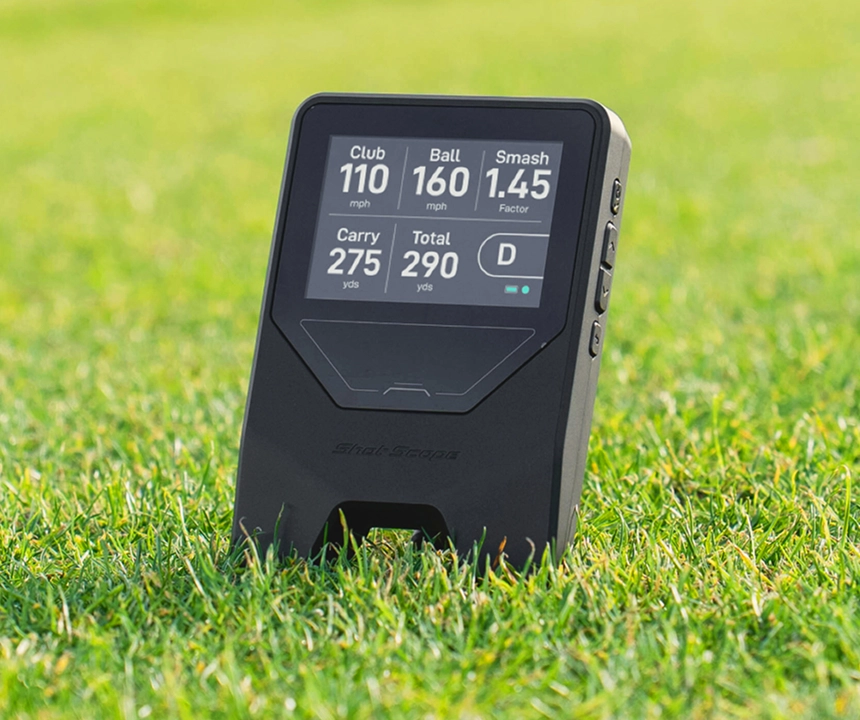
The unit uses a single Doppler radar sensor to report five data points: ball speed, clubhead speed, smash factor, estimated carry distance, and total distance. What it leaves out is just as critical. The LM1 does not measure spin rate, launch angle, or lateral dispersion.
Because it tracks velocity instead of full ball flight, carry numbers rely entirely on algorithms. You must manually select your club on the device so the software knows which trajectory model to calculate. If you hit a low punch shot, the unit only sees ball speed and assumes a standard high arc. Outdoor wind will widen the gap between your real ball flight and the screen number.
Driver variability is the main weakness. Compact Doppler units often struggle to separate clubhead speed from ball launch at high velocities. More importantly, off-center driver strikes swing spin by thousands of RPM. Because the LM1 cannot see spin, a low heel strike and a pure center strike with identical ball speed produce the same calculated carry.
Set your expectations around two rules:
- Use it to track swing speed gains and baseline iron gapping.
- Ignore total distance estimates and rely on ball speed and carry trends.
This setup works well for golfers doing overspeed training or dialing in wedge yardages into a net. If you need to optimize driver launch windows, fit shafts, or track directional dispersion, look elsewhere.
Usability and Setup: How the LM1 Performs on the Range
In any honest Shot Scope LM1 review, usability comes down to a clear distinction: this is a low-friction practice tool if you follow placement rules, not a phone-connected simulator experience.
Its biggest operational advantage is standalone speed. You select your club, set the unit behind the ball, swing, and read your numbers immediately on the built-in color display. Internal shot storage means you do not need your phone propped on a bag or tethered over Bluetooth during practice. You can hit fifty balls and sync the session to the mobile app later for review.
Friction points exist if you cut corners on setup. The compact screen can wash out under direct mid-day sun, and radar placement is unforgiving. Slight misalignments or shifting your hitting spot during a session cause phantom accuracy issues. If you swap from an 8-iron to a 5-iron without updating the club on the device, the calculated distances will look wildly inaccurate.
Keep data expectations grounded. The LM1 is strictly for practice data: ball speed, club speed, smash factor, and carry or total distance. You will not get shot shape, lateral dispersion, or launch angle graphics. If you want full virtual rounds on a PC, look at what launch monitors work with GSPro, because the LM1 does not integrate with third-party simulation software.
If you want a sub-$250 monitor that turns on in ten seconds and gives fast feedback into a net or on the range, the LM1 eliminates routine setup headaches. If you want interactive simulation, look elsewhere.
Space Requirements: How Much Room You Need for an Indoor Net Setup
The practical reality of the Shot Scope LM1 comes down to geometry. Outdoor range use is the most consistent environment, but an indoor net setup works well if you have adequate room depth and keep your placement repeatable.
Radar units need clear runway to track the ball. You must place the LM1 roughly 4 to 5 feet directly behind the ball. You also need at least 8 feet of ball flight from the hitting mat to your net so the radar can measure velocity accurately. That puts your practical room depth target at around 13 feet. Extra space always helps, but squeezing under 13 feet will degrade your numbers.
Indoor environments introduce specific failure modes you will not encounter outdoors:
- Short ball flight: Hitting the net too quickly cuts off the radar tracking window.
- Environmental noise: Concrete echo, fans, and metal garage door tracks can trigger dropped shots or misreads.
- High-speed variance: Driver and fairway woods are the first to show inconsistent numbers in tight spaces.
Run through this checklist before buying:
- Can you set the unit 4 to 5 feet behind the ball without hitting walls or garage tracks?
- Can you maintain a consistent ball-to-net distance on every swing?
- Is your hitting mat stable enough to prevent shifting ball positions?
If your space cannot comfortably hit 13 feet of depth, explore our guide on building a golf simulator for small rooms to see how camera-based alternatives handle tight footprints.
For garage net setups, the LM1 is a solid budget tool for speed practice and iron gapping. If you want full simulation realism or measured spin optimization, step up to a dedicated indoor monitor.
Total Cost of Ownership: Subscriptions, Accessories, and Upgrade Reality
The Shot Scope LM1 delivers one of the lowest true 3-year costs in golf launch monitors because there is no subscription fee attached to the hardware.
Here is the actual 3-year math:
- Hardware: $199 upfront.
- Subscription: $0. Core shot tracking and companion app features require no recurring fees.
- Accessories: Minimal. The unit includes a charging cable and case, so you only need basics like an alignment aid and a consistent hitting mat setup.
Your total 3-year baseline spend stays right around $200.
The real catch at this budget tier is the upgrade cliff. If your training goals expand to include measured spin, launch angle, or lateral dispersion, none of that can be unlocked through a paid firmware update. You have to replace the hardware entirely.
If you later decide you want full virtual rounds, you will need simulation software, a gaming PC, an impact enclosure, and a different launch monitor. For an itemized look at complete setup expenses, check out our golf simulator total cost breakdown.
Choose your path before buying:
- Practice-only path ($350 to $500 total): Pair the LM1 with a net and hitting mat for simple garage speed training.
- Entry simulation path ($1,000 to $1,500+ total): Skip the LM1 and step up immediately to a device that supports simulator software.
The LM1 is an excellent buy if you are allergic to subscriptions and only need basic speed numbers. If you know you will want simulated course play or directional ball flight later, save the $200 and invest directly in a simulator-ready platform.
Shot Scope LM1 vs. PRGR: When to Step Up to a Sim-Ready Monitor
If you want a dead-simple personal launch monitor with a fast on-device experience, the Shot Scope LM1 is usually the cleaner buy over a PRGR. If you want a real software path, you will quickly outgrow both units.
Comparing the LM1 to the PRGR comes down to workflow and data expectations at the sub-$250 tier:
- Display and range workflow: The LM1 features an integrated color screen that delivers immediate speed and carry feedback without propping up a phone. The PRGR is equally portable, but its monochrome LCD feels a generation behind.
- Placement habits: Both radar units require strict alignment discipline. You need consistent placement 4 to 5 feet directly behind the ball because the user is part of the system. Sloppy positioning creates bad data on both.
- Data ceiling: Both devices are limited to velocity metrics and calculated carry. Neither unit measures spin rate, launch angle, or lateral shot direction.
Step up to a higher price tier when your practice hits these specific decision triggers:
- You need measured spin rates and launch angles to dial in club gapping.
- You want virtual course play on simulation platforms like GSPro or E6 Connect.
- You need reliable driver truth rather than algorithm-based distance estimates.
If you decide to upgrade, the Garmin R10 ($599) is the standard entry-level gateway for simulator play. The Rapsodo MLM2PRO ($699) adds camera-hybrid tracking and richer range data, though it requires recurring subscription costs and has its own tradeoffs. If you are budgeting a full starter build, check our guide to the best golf simulator under $1,000.
The buyer map is simple: LM1 = practice data first; R10/MLM2PRO tier = software path and more parameters.
The Verdict: Is the Shot Scope LM1 Worth It?
The Shot Scope LM1 delivers exactly what it promises: standalone ball speed, clubhead speed, and estimated carry feedback for $199 with zero subscription fees. It is a focused speed and distance practice tool, not an entry-level golf simulator. If you evaluate it inside that specific lane, it is one of the cleanest values in golf tech.
| Category | Judgment |
|---|---|
| Accuracy | Decent for wedge and iron speed trends. Struggles with driver fitting and outdoor wind because it cannot measure spin or launch angle. |
| Usability | Excellent. Standalone color display, internal shot storage, and zero mandatory phone pairing create a seamless grab-and-go workflow. |
| Indoor / Space Fit | Practical for garage net setups with at least 13 feet of total depth (4 to 5 feet behind the ball, 8+ feet of ball flight). |
| Software & Data | Basic. Strictly a practice tracking tool with companion app sync. No third-party simulation support for GSPro or E6 Connect. |
| 3-Year Value | Outstanding. A flat $199 upfront cost with $0 recurring fees. |
Before buying, be clear about the hardware limitations. The LM1 does not measure spin rate, launch angle, or lateral shot dispersion. Every distance number on the screen is an algorithm-based calculation that assumes a standard trajectory and requires you to manually select the correct club. When you swing a driver, hit off-center, or practice into a stiff crosswind, you will quickly find the ceiling of single-radar velocity tracking.
Who Should Buy the Shot Scope LM1
- The budget-conscious practice golfer: You want honest carry and ball speed feedback into a backyard or garage net for under $200.
- The wedge and speed trainer: Your main goals are dialing in iron yardage baselines, checking wedge gaps, or tracking swing speed gains with overspeed training sticks.
- The friction-averse player: You want a device you will actually use every session because it turns on instantly without tethering an iPad or managing an annual software subscription.
Who Should Look Elsewhere
- The home simulator builder: You plan to play virtual courses on GSPro, E6 Connect, or Awesome Golf.
- The club fitter and driver tuner: You need measured spin windows, apex height, launch angles, or left-and-right dispersion data.
- The space-constrained golfer: Your indoor hitting area cannot accommodate at least 13 feet of straight depth.
If your goal is better range practice for $200, the LM1 is a sensible buy. If your goal is simulation or measured spin, skip the middle step and buy in the right class.
Frequently Asked Questions
Is the Shot Scope LM1 worth it in 2026?
Yes, the Shot Scope LM1 is worth its $199 price if you strictly want portable swing speed, ball speed, and estimated carry feedback for range or net practice. It is not worth buying if you expect virtual golf simulation, launch angle data, or measured spin. At this entry price with zero subscription fees, it is a focused practice tool rather than a full simulator.
How accurate is the Shot Scope LM1 with irons versus driver?
The Shot Scope LM1 delivers dependable carry and speed data on wedge and iron shots, but accuracy drifts noticeably on high-speed driver swings. Because the radar measures ball velocity and calculates distance using fixed algorithm models, off-center driver strikes with unusual spin rates still display generic calculated yardages. Perceived accuracy also depends heavily on placing the unit squarely behind the ball and updating the club selection on the screen when you change clubs.
Does the Shot Scope LM1 measure spin, launch angle, or dispersion?
No, the Shot Scope LM1 does not measure spin rate, spin axis, vertical launch angle, or lateral shot dispersion. The hardware only tracks ball speed and clubhead speed, which it uses to calculate smash factor, estimated carry distance, and total distance. Without measured spin and directional ball flight, you cannot use the LM1 for driver spin optimization, shaft fitting, or shot-shape mapping.
Can I use the LM1 indoors into a net, and what space do I need?
Yes, you can use the LM1 indoors into a hitting net, provided you have at least 13 feet of total room depth. The radar sensor needs 4 to 5 feet of clear space directly behind the ball, plus a minimum of 8 feet of ball flight from the hitting surface to the net. Setting up in tighter spaces reduces the radar tracking window and creates inconsistent speed readings.
Shot Scope LM1 vs PRGR: Which should you choose?
Choose the Shot Scope LM1 if you prefer an integrated color display and automatic app syncing, or choose the PRGR if you want a basic monochrome speed reader with a proven standalone track record. Both units rely on Doppler radar to measure velocity without tracking spin or direction. Neither device connects to simulator software, so your choice comes down to interface preference and workflow.
Related Guides
Mevo+ vs SkyTrak+: Radar vs Optical for Your Home Sim
Deciding between Mevo+ vs SkyTrak+? Compare space requirements, GSPro compatibility, and 3-year costs to find the perfect launch monitor for your home.
What is GSPro? The Complete Golf Simulator Software Guide (2026)
Wondering what is GSPro golf simulator software? Discover how it works, 2026 costs, PC requirements, compatible launch monitors, and how to get courses.
GSPro vs E6 Connect (2026): The Honest Comparison for Home Simulators
Deciding between GSPro vs E6 Connect? Read our honest 2026 comparison of costs, course libraries, physics, and system requirements to find your perfect fit.