
Foresight GC2 (2026) Review: Same Name, New Launch Monitor

Foresight GC2 2026 Review: Same Name, New Launch Monitor
Foresight reused a legendary badge, but used listings will mislead you. Sorting new GC2 vs old GC2 matters before spending $1,699: this is the October 2026 dual-camera unit, not the legacy model discontinued in 2023.
This Foresight GC2 2026 review tackles the tradeoff: measured ball flight with no club tracking. Before buying, weigh that ball-only ceiling, the Foresight+ tiers, and your room setup. Here is how the data holds up.
Ball Data and Accuracy: What the GC2 Measures (and the Hard Ceiling You Cannot Pay Past)
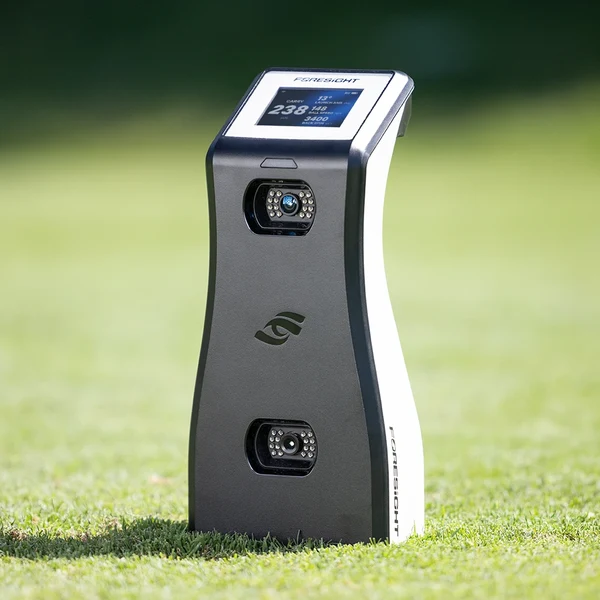
If your main priority is knowing exactly what the ball did in the air, the hardware delivers. Foresight built this unit around a dual high-speed camera system that measures 14 ball metrics: ball speed, launch angle, launch direction, back spin, side spin, total spin, spin axis, carry, total distance, offline, peak height, descent angle, hang time, and curve. For bag gapping, dialing in carry numbers, and practicing curvature control, that profile covers what you need.
Because this unit arrived in late 2026, independent impressions are still early in their cycle and limited to launch-window reviews. In comparisons against higher-tier reference units, the numbers held up well. Breaking Eighty reported the ball data was virtually the exact same numbers as their GC3 and Launch Pro reference unit, though they noted the hitting area felt notably small on a grass range. Lets Play Thru similarly found the monitor extremely accurate and on par with a Bushnell Launch Pro and GC4 for ball metrics.
Here is the catch that any honest Foresight GC2 2026 review must put front and center: there is zero GC2 club data. Foresight lists no club metrics for the device. You get no club head speed, club path, face angle, or angle of attack. As Breaking Eighty pointed out, there is no paid unlock or software upgrade to add it later.
That creates a hard ceiling. If you want to diagnose swing mechanics or test a new driver on your launch monitor, ball metrics only tell half the story. It works well for target practice and course play, but golfers needing club delivery feedback to fix a swing fault will outgrow it immediately.
Setup and Day-to-Day Usability: Screen, Battery, Connectivity, and the Hitting Zone Reality
On paper, a portable launch monitor sounds effortless to take anywhere. In practice, daily usability comes down to how often you must adjust the hardware between swings.
Physically, the 2026 GC2 travels easily between a garage bay and the practice range. It measures 5.45 inches wide, 4.6 inches deep, and 11.9 inches tall, weighing 4.5 pounds (2.04 kg). Foresight built it for indoor and outdoor use, adding an integrated 2.8-inch color display. Having that screen means you can read core numbers directly on the unit without balancing a phone or tablet on the ground.
The hitting zone is where daily usability divides between indoor and outdoor sessions. Foresight lists the hitting zone at 123 square inches. Indoors on a quality hitting mat, that surface area is plenty because your striking position rarely shifts.
On natural turf, grass wear changes the experience. Breaking Eighty observed during grass-range testing that the hitting area felt notably small. After taking two or three iron divots, you run out of clean turf inside that 123-square-inch window, forcing you to nudge the unit to find fresh grass.
Battery capacity and connections keep the rest of the workflow simple. The internal lithium-ion battery provides 5 to 7 hours of runtime, which easily covers extended range sessions. For data transfer, the unit includes Wi-Fi, Bluetooth, Ethernet, and a USB Type-C port.
If you practice indoors from a fixed mat position, day-to-day usability is fast and painless. If your routine centers on grass ranges and carving divot patterns, the small hitting zone requires regular repositioning.
Software, Compatibility, and Subscriptions: Foresight+ Tiers, Course Pass, and the GSPro Question
Before choosing hardware, you need to understand the software stack and ongoing fees. Foresight retired its older standalone FSX software lineup and built everything around Foresight Premier, which runs on the Foresight+ membership system. If you plan to use this launch monitor for virtual golf, navigating each Foresight+ subscription tier requires looking closely at the total math.
The membership structure breaks down into three baseline tiers:
- Free: Provides basic app and Foresight Premier access with limited shot history.
- Silver ($199/year): Built for serious practice and unlocks eligibility to purchase course packs.
- Gold ($599/year): Unlocks third-party software integrations on paper.
Playing simulated courses requires a second paid add-on on top of your base membership. Course Pass costs $295 per year for 37 full courses, while Course Pass Pro runs $595 per year for 118 full courses. Because both packs require an active Silver or Gold tier, simulated course play on Foresight software starts at a minimum of $494 annually before adding PC hardware. When you calculate that over three years, checking the real subscription costs across simulator platforms helps put that ongoing expense into perspective.
The biggest hurdle for home simulator builders is GSPro compatibility. Foresight says on its membership portal that Gold members are eligible to purchase and use GSPro. However, Foresight's own GSPro integration support page explicitly states: "DOES NOT SUPPORT GC2 DEVICE FUNCTION."
Because Foresight's own materials directly conflict on this point, you cannot assume GSPro works out of the box with the 2026 GC2. If running GSPro is your non-negotiable goal, do not make assumptions. Confirm current hardware support directly with Foresight before spending your money.
Space and Placement: What to Check Before You Commit (Especially in a Small Room)
Planning a compact build around a launch monitor requires separating published specs from the practical layout of your room. With the 2026 GC2, the concrete figure you can plan around is its 123-square-inch hitting zone. Because optical cameras track the ball directly at impact, that hitting area dictates your daily setup routine.
In a dedicated indoor bay with a hitting mat, that footprint is straightforward to manage. You set the unit beside the turf, mark your preferred ball position once, and leave it in place. As long as the ball sits inside that designated zone, the cameras capture clean launch metrics without you adjusting the monitor between swings.
The major advantage of a floor-mounted camera unit in a tight space comes down to geometry. Radar devices sit behind the player and require extra ball-flight distance to track spin, demanding substantial total room depth. A camera unit sits beside the strike location instead. You still need full clearance to swing comfortably and safe distance from ball to screen, but you eliminate the dead buffer zone behind the golfer that radar systems demand.
The main friction point comes with righty-lefty play. Because the unit tracks from the side, alternating between right-handed and left-handed golfers means moving the monitor across the hitting strip and realigning it between turns.
If your space is tight on clearance, check our guide on how to build a simulator that actually fits in a small room to sanity-check your swing arc, screen distance, and stance area before committing.
Total Cost of Ownership (3-Year Reality): Hardware Price vs Membership Stack
The upfront Foresight GC2 price sits at $1,699. Foresight includes a power adapter and cable, an alignment stick, a one-year warranty, and 30 days of Foresight+ Gold Membership with Course Pass Pro in the box. That 30-day trial gives you immediate access to full course libraries, but mistaking that promotional window for permanent software access is an expensive error. Once the trial expires, recurring memberships determine your true long-term investment.
| Setup Path | Annual Software Fees | 3-Year Total Cost |
|---|---|---|
| Hardware Only (Free tier, range and net practice) | $0 | $1,699 |
| Practice Tracking (Silver tier) | $199/yr | $2,296 |
| Course Play (Silver + Course Pass) | $494/yr ($199 + $295) | $3,181 |
| Full Foresight Stack (Gold + Course Pass Pro) | $1,194/yr ($599 + $595) | $5,281 |
The hardware supports two distinct financial paths. If your goal is hitting into a net and reading ball speed, launch angle, and spin on the integrated screen or basic app, staying on the Free tier keeps it a budget-friendly optical monitor with zero ongoing fees. The moment you want simulated course play or third-party software integrations, the stacked subscription structure fundamentally alters the purchase.
If your alternative is spending more upfront on a launch monitor that measures club delivery out of the box, the GC2 is priced to tempt you. That initial hardware savings can evaporate quickly once you stack memberships over three seasons. Third-party simulation platforms like GSPro also represent an ongoing $250 per year cost to budget alongside your setup. Comparing these paths against our golf simulator total cost breakdown will help you determine whether this recurring software stack fits your long-term plan before you commit.
Verdict: Is the Foresight GC2 (2026) Worth It for a Home Golfer?
The bottom line of this Foresight GC2 2026 review comes down to your practice goals. At $1,699, the hardware brings dependable optical ball tracking down into a mid-tier price bracket, but it enforces a strict operational ceiling. You get clean launch and spin numbers, but zero club path or face delivery feedback to explain why the ball flew that way.
| Category | Judgment |
|---|---|
| Ball data accuracy | Excellent. 14 measured ball metrics deliver reliable carry, launch, and spin axis. |
| Club data / diagnostics ceiling | Poor. Zero club tracking, and no paid unlock path exists. |
| Software and memberships | Restrictive. Foresight+ tiers add recurring fees, and GSPro integration remains conflicted. |
| Space and placement fit | Good. Side-mounted cameras eliminate radar depth needs, though the 123-sq-in zone is compact. |
| Value over 3 years | Conditional. A bargain at $1,699 for net work, but course play pushes total cost to $3,181. |
Buy It If
- You prioritize photometric ball data accuracy above everything else and want proven indoor camera tracking.
- You practice in a tight garage bay or basement where radar units run out of required room depth.
- You plan to run the free practice app or a basic Silver tier into a net without buying expensive course packages.
- You accept that the unit is ball-only, with no future path to clubface delivery metrics.
Skip It If
- You need clubhead speed, club path, angle of attack, or face-to-path numbers to diagnose a swing fault.
- Your entire simulator plan assumes an out-of-the-box, native GSPro workflow.
- You want an all-in-one course simulation package without stacking annual Foresight+ and Course Pass fees.
The critical limitation comes down to that data ceiling. The 2026 GC2 measures ball flight only, with zero club-data capability and no paid unlock path to add it later. If your practice or fitting plans depend on club delivery diagnostics, this monitor creates a hard wall you cannot pay your way past.
Cross-Shop Before You Commit
If you are weighing this monitor against other setups, look at these two options before spending your money:
- Explore the GC3S upgrade path in the Foresight family if you want to remain within Foresight's software ecosystem but require native clubhead metrics.
- Check our GC2 vs Square Omni head-to-head if you want club delivery data, broader software flexibility, and zero mandatory subscription fees at a similar price tier.
If your practice routine centers purely on dialing in carry distances and shape control, the GC2 is a rational buy. If you need club diagnostics, buy the right category from day one instead of paying twice.
Foresight GC2 (2026) FAQ
Is the 2026 GC2 the same thing as the old GC2 on used sites?
No, the 2026 Foresight GC2 is a completely different launch monitor released on October 15, 2026. Foresight officially discontinued the original, legacy GC2 on June 30, 2023. Because Foresight reused the exact same model name, secondhand listings on used equipment sites and forums almost always refer to that older legacy hardware. Always check the physical unit specifications and release year before sending payment for a used listing.
Does the GC2 have club data or can you unlock it later?
No, the 2026 GC2 measures ball data only and cannot track club data under any circumstances. There is no add-on sensor package, firmware upgrade, or paid software unlock available to add club metrics later. If your practice routine requires clubhead speed, path, face angle, or angle of attack to diagnose a swing fault, this hardware will not provide them.
What is the Foresight GC2 price and what do you get with it?
The Foresight GC2 price is $1,699 for the standard bundle. In the box, Foresight includes the GC2 launch monitor, a power adapter and charging cable, an alignment stick, a one-year warranty, and a 30-day trial of the Foresight+ Gold Membership with Course Pass Pro. Once that initial 30-day window expires, continuing virtual course play requires an active paid annual software subscription.
What does Foresight+ cost, and do I need Course Pass to play courses?
Foresight+ memberships cost either $0 (Free), $199 per year (Silver), or $599 per year (Gold), and playing simulated courses always requires purchasing a separate Course Pass add-on. Course Pass costs $295 per year for 37 full courses, while Course Pass Pro runs $595 per year for 118 full courses. Because both course tiers require an active Silver or Gold membership, full course play on Foresight software costs a minimum of $494 every year.
Does the GC2 work with GSPro?
Official GSPro compatibility remains uncertain due to conflicting documentation published by Foresight. While Foresight notes on its membership portal that Gold tier members are eligible to purchase and run GSPro, Foresight's official GSPro integration support page explicitly states that it does not support GC2 device function. Check our guide on launch monitors that work with GSPro and verify current compatibility directly with Foresight support before buying the monitor. As noted throughout this Foresight GC2 2026 review, you should not assume third-party software works out of the box until Foresight officially reconciles those conflicting statements.
Related Guides
BenQ AK800ST Review: The "AI Golf Projector"
In this BenQ AK800ST review, explore throw ratio math, 4K performance, AI Sim Sense, and mounting limits to see if this golf sim projector fits your bay.
Rapsodo MLM2XPRO Review (2026): Rapsodo's New Flagship
Read our in-depth Rapsodo MLM2XPRO review to discover putting accuracy, room size needs, GSPro support, and true subscription costs before you buy.
SkyTrak ST MAX Review (2026): The SkyTrak+ Replacement
Read our honest SkyTrak ST MAX review to discover club data accuracy, GSPro support, space requirements, and whether it is worth buying for your home bay.