
SkyTrak ST MAX Review (2026): The SkyTrak+ Replacement

SkyTrak ST MAX Review (2026): The SkyTrak+ Replacement
If you planned to buy a SkyTrak+, inventory is clearing out as the SKYTRAK™ ST MAX Launch Monitor takes over. If you are cross-shopping discounted stock, start with the ST MAX vs SkyTrak+ comparison.
Reviewers frame the ST MAX as a hardware refinement rather than an accuracy leap over its predecessor. This breakdown examines club data, GSPro support, space fit, and membership fees, starting with what those sensors actually measure on the mat.
Accuracy and Club Data: What You Actually Get (and What You Still Don’t)
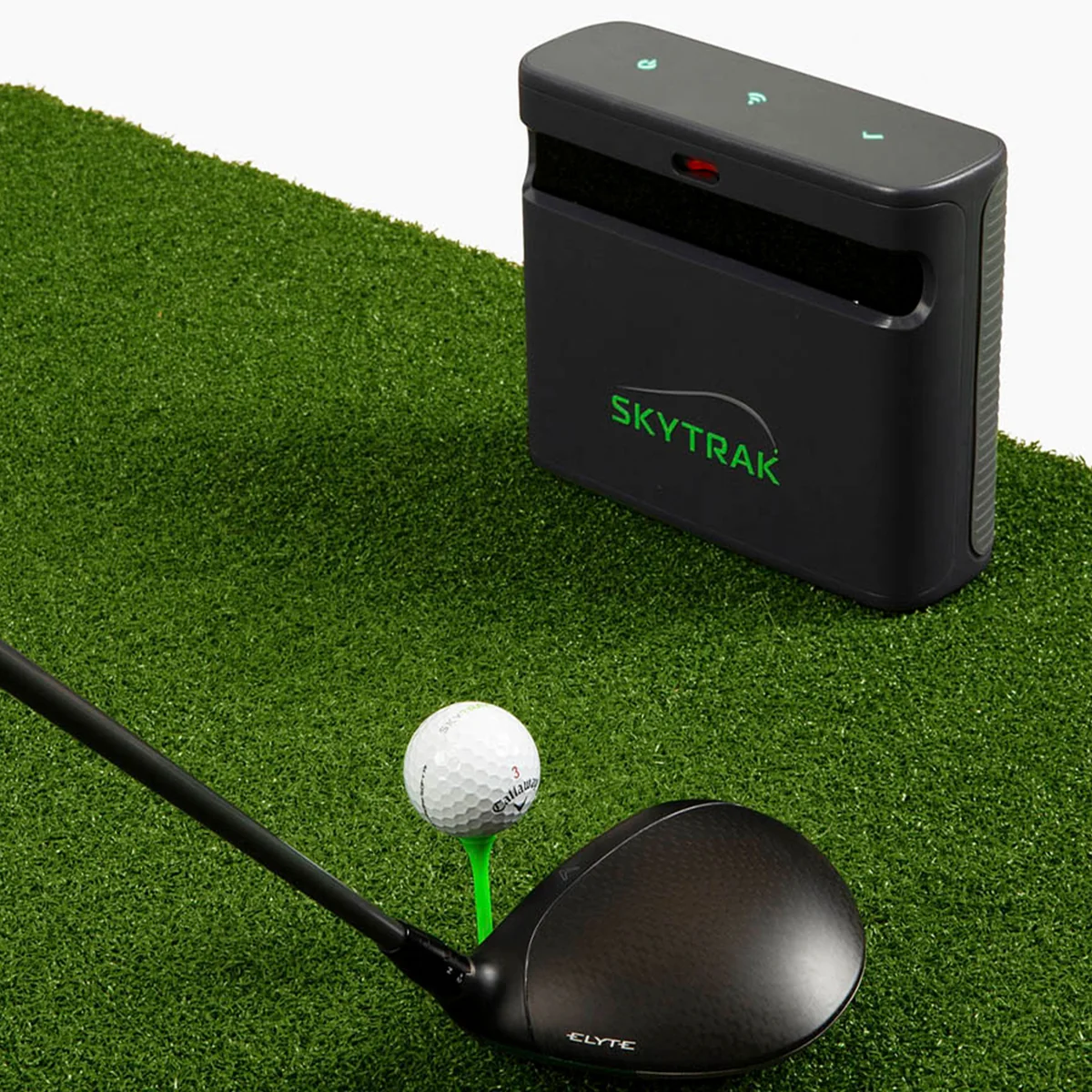
When investing between $1,695 and $2,995 on a launch monitor, you are paying for two core deliverables: dependable ball flight indoors and usable club-delivery feedback. In any honest SkyTrak ST MAX review, tracking performance is where expectations must be set straight from the start. Independent gear reviewer Breaking Eighty points out that the ST MAX uses essentially the same shot-tracking hardware and core tracking performance as the outgoing SkyTrak+. The updates on the ST MAX center on dual USB ports, a faster processor for a snappier interface, a color refresh, and a dedicated Speed Training mode, rather than an accuracy leap in raw optical or radar measurement.
What you get on the mat is a 10cm x 10cm shot detection area that captures club delivery without requiring adhesive face stickers or specially marked balls. According to SkyTrak's published specifications, the exposed ST MAX club data includes:
- Club head speed
- Smash factor
- Club path
- Face angle
- Face-to-path
- Face-to-target
Here is the technical reality to understand before buying. SkyTrak markets these figures as club data, but the manufacturer does not clearly designate on its US product page which specific metrics are directly sensed by the unit versus which are derived through mathematical modeling. Because of that ambiguity, the smartest way to use these numbers is for swing pattern work rather than absolute club fitting. The unit gives you practical feedback on whether your path is creeping out-to-in or if your face was delivered open relative to your target, but you should not treat it like a commercial lab instrument.
The biggest operational blind spot in the club data suite is angle of attack. Breaking Eighty singled out the ST MAX for lacking an angle-of-attack metric entirely, which leaves a notable hole in your delivery picture. If you are trying to optimize driver carry by measuring your upward strike, or checking how cleanly you hit down on long irons, the ST MAX cannot tell you. For a device in this price bracket, missing delivery angle limits its utility as a complete swing-building tool.
This club tracking setup fits mid-to-high handicap golfers who want clean, sticker-free feedback to diagnose a slice or hook at home and will accept that it is not a TrackMan replacement. However, if you already own a SkyTrak+ or can find one heavily discounted with a warranty, the identical tracking engine makes the ST MAX a tough sell. Players who specifically require angle of attack, impact location, or fully instrumented delivery validation will be better served looking at dedicated photometric units like the Bushnell Launch Pro.
Usability in a Real Home Bay: Shot Delay, Speed Training, and Misread Risk
On-screen shot latency defines how a simulator actually feels to play. Shot-to-screen delay remains part of the SkyTrak experience, which affects the fun of sim golf far more than paper specs suggest. Independent reviewers note that earlier SkyTrak models carried a visible lag of about 1 to 1.5 seconds between impact and ball launch. The ST MAX feels smoother and ball flight renders slightly faster, but you will still notice a brief pause before the shot takes off on screen.
Speed Training Powered by GOLFTEC is the primary functional upgrade for day-to-day practice, and SkyTrak lists it as exclusive to the MAX. Because the unit tracks clubhead speed without ball impact, golfers swinging speed sticks can run protocols directly in the bay. For players focused on overspeed training who want to avoid buying a separate handheld radar, this feature is the single operational reason to pick the ST MAX over a discounted predecessor.
Getting started requires patience. Reviewers report that first-day setup across account logins, firmware updates, and installing iPad and PC apps takes about an hour.
Once running, daily reliability depends on your bay habits and hitting surface. SkyTrak specifies a compact 10cm by 10cm shot detection area, and inconsistent ball placement inside that window creates misreads. Connection stability also splits owners. Network Mode frequently drops connection, whereas switching over to Direct Mode resolves stability issues for most players.
Alignment drift is another common owner complaint where your target line feels like it moves across a session. Experienced builders counter this by placing alignment sticks down and physically taping unit placement on the turf. If you are planning a third-party software build, checking what launch monitors work with GSPro helps set realistic expectations. If you want a zero-drama monitor at this price point, you should weigh these friction points carefully before buying.
Software, Membership Plans, and GSPro: The Compatibility Reality
The most reliable rule in simulator planning is simple: decide on your simulation software first, then buy the hardware that runs it. Too many golfers purchase the launch monitor first, only to realize the operating software requires an unexpected subscription or relies on an awkward workaround.
With this unit, the software ecosystem splits into two very different paths: SkyTrak's proprietary walled garden and community-driven third-party integrations.
The baseline experience revolves around SkyTrak membership plans, which underwent a restructuring. Beyond the basic driving range, SkyTrak offers four subscription tiers:
- Essential ($99.99 per year): Unlocks full practice features, game improvement tools, and skill challenges.
- Core: Foresight ($299.99 per year): Includes the Essential feature set plus a 49-course library powered by Foresight Sports.
- Core: TrackMan ($349.99 per year): Replaces the Foresight library with 51 premium virtual courses powered by TrackMan.
- Elite ($599.99 per year): Bundles both the Foresight and TrackMan course packs for 100 total courses.
Hardware compatibility dictates where you can run these courses. For Apple users, SkyTrak specifies an Apple M1 chip or better for macOS and iOS, and explicitly notes that currently no iPhone will work with course play. If you plan to move past an iPad and drive a dedicated projector on a Windows PC, you need serious graphics power. SkyTrak lists GPU guidance of an Nvidia GeForce 1060 or AMD RX 5600 with 4GB memory or more for HD graphics, and an RTX 2060 or RX 6600 with 8GB memory or more for 4K graphics.
The dynamic changes when looking at an ST MAX GSPro setup. GSPro costs $250 per year, but SkyTrak is not officially supported by the software developer. Getting your ball flight into GSPro requires using third-party community connectors.
In connector demos, community members show that these workarounds provide two-way communication, displaying club selection, club data, and simulated putting straight in GSPro. However, the operational risk is real. A routine SkyTrak software update can break community connector workflows without warning, leaving you waiting for a community patch. When a disconnect happens mid-round, you are troubleshooting through forum and Discord threads rather than official customer support.
If GSPro is a non-negotiable requirement for your home bay, treat the monitor as a community-enabled setup rather than an officially supported integration. If you are weighing other sub-$3,000 options with different software philosophies, check out our breakdown on MLM2PRO vs SkyTrak (what you gain and what you give up) before committing.
Space Requirements and Placement: Will It Fit Your Room?
Before looking at any launch monitor specs, swing clearance dictates whether a home simulator can actually work in your space. If you cannot take a full, unrestricted swing with your longest club without clipping drywall or a ceiling joist, no piece of hardware can salvage the room. SkyTrak notes that safe ceiling height varies based on the golfer and club length, meaning an eight-foot basement might clear a wedge while shutting down a driver.
In the ST MAX user guide, SkyTrak lists the minimum unobstructed area dimensions as 10 feet in length and 10 feet in width. That 10x10 footprint represents the bare operational floor space for the device, but it is not the same as a functional simulator bay. A real build must budget for screen standoff, enclosure depth, and safe clearance behind your backswing.
Where this hardware shines against radar competition is depth efficiency. Per SkyTrak, the launch monitor sits next to the ball rather than requiring up to 8 feet behind the hitting area. You do not sacrifice floor space behind your stance to accommodate a Doppler tracking cone.
For overall room depth, SkyTrak states that a room depth of 17 feet offers a comfortable and spacious setting. In a realistic golf simulator room size plan, 17 feet accounts for screen buffer off the wall, safe ball flight into the impact screen, and comfortable breathing room behind the golfer. If your room is under 18 feet deep, this side-mounted design is far easier to fit than a floor radar unit.
Because the unit sits beside the ball, placement consistency directly impacts read reliability. Using alignment sticks and marking your mat helps keep the ball centered in the hitting zone and prevents alignment drift. SkyTrak also recommends using a hitting mat for both indoor and outdoor use for optimum performance, making the unit best suited for indoor bays and mat-based range sessions rather than uneven grass turf.
ST MAX Price and 3-Year Total Cost: The Math Most Reviews Hide
The sticker price on a launch monitor is never the check you actually write if you want to play virtual golf. Out of the box, unactivated hardware gets you a basic practice range and little else. Understanding the true ST MAX price means looking at recurring software fees from day one.
SkyTrak lists the hardware at a regular price of $2,995.00, with a sale price of $1,695.00 on its product page. To unlock practice tools and virtual courses, you choose between four annual membership tiers:
- Essential ($99.99/year): Skill challenges and deep game-improvement data.
- Core: Foresight ($299.99/year): Practice tools plus a 49-course Foresight library.
- Core: TrackMan ($349.99/year): Practice tools plus 51 TrackMan-powered courses.
- Elite ($599.99/year): Combines both course libraries for 100 courses total.
SkyTrak currently includes one free year of the Core: Foresight tier with purchase, activated once you receive and register the device. That promotion softens the upfront blow, but it is not free forever. In years two and three, annual renewals kick in. GSPro is never bundled into these tiers and remains an independent $250 annual subscription.
| 3-Year Ownership Scenario | Hardware Upfront | Year 1 Software | Years 2 & 3 Software | 3-Year Total |
|---|---|---|---|---|
| Sale Price + Core: Foresight | $1,695.00 | $0.00 (Promo) | $599.98 ($299.99/yr) | $2,294.98 |
| Regular Price + Core: Foresight | $2,995.00 | $0.00 (Promo) | $599.98 ($299.99/yr) | $3,594.98 |
| Sale Price + Core (FS) + GSPro | $1,695.00 | $250.00 (GSPro) | $1,099.98 (Both) | $3,044.98 |
Before committing your budget, consult the full golf simulator subscription cost breakdown to see how these ongoing fees compare across other platforms.
For golfers cross-shopping clearance inventory, this math defines the decision. Independent reviewer Breaking Eighty notes the unit shares essentially the same shot-tracking hardware as the outgoing SkyTrak+. If you find a discounted previous-generation unit with a warranty, paying the premium here makes sense only if you specifically want the Speed Training mode and a snappier interface. Otherwise, the ongoing 3-year running costs are identical.
Verdict: Is the SkyTrak ST MAX Worth It in 2026?
The SKYTRAK™ ST MAX Launch Monitor is the current model in the SkyTrak lineup, but it is not automatically the best buy for every bay. Independent reviewers frame the device as a hardware refinement rather than a new tracking generation, which means its value proposition hinges on current retail pricing and whether discounted predecessor inventory remains available. If you want a polished, space-friendly practice monitor with club delivery numbers, it delivers a capable package as long as you plan for ongoing software commitments.
| Category | Judgment |
|---|---|
| Accuracy & Club Data | Solid ball flight tracking and useful sticker-free path metrics. Reviewers note the tracking hardware mirrors the previous generation, and the lack of angle of attack limits deep club fitting. |
| Usability | Snappier processing speeds up shot rendering, and the exclusive Speed Training mode adds real practice utility. Alignment drift and ball placement sensitivity still require care. |
| Software & Compatibility | Dependable Apple and PC support across tiered SkyTrak memberships. Unofficial GSPro community connectors function well, but SkyTrak updates can disrupt them. |
| Space Requirements | Excellent depth efficiency. Sitting beside the ball eliminates radar depth requirements behind the stance, fitting comfortably in rooms with 17 feet of total depth. |
| Total Cost & Value | Highly competitive at the $1,695 sale price, but annual membership plans and third-party software push the realistic three-year cost above $2,300. |
Buy It If:
- You want an iPad- or Mac-friendly simulation ecosystem and value the built-in, ball-free Speed Training protocol enough to pay for newer hardware.
- You want club path and face-angle feedback without sticking metallic dots on your irons or buying specialized balls, and you accept missing an angle-of-attack metric.
- You have a tight garage or basement where sitting beside the ball avoids the 18 to 20 feet of total room depth that floor-mounted radar units demand.
Look Elsewhere If:
- You are shopping primarily for GSPro. Because SkyTrak updates can break community connector workflows, buying this hardware specifically to run unsupported third-party software introduces recurring troubleshooting friction.
- You expect a measurable tracking leap over older hardware. Reviewers agree the core tracking engine is largely unchanged from the SkyTrak+, meaning a discounted predecessor with a warranty offers identical ball data for less money.
- You resent recurring subscription fees. Running full course libraries requires paying ongoing annual membership fees ranging from $99.99 to $599.99 per year.
This SkyTrak ST MAX review comes down to hardware refinements versus total cost. The unit is a refined side-mounted monitor for golfers prioritizing room efficiency, sticker-free path numbers, and integrated speed training. If you are mapping out your complete hardware and enclosure budget, see how it stacks up within our guide to the best golf simulator builds under $3,000 before buying.
SkyTrak ST MAX FAQ (Real Buyer Questions)
Is the SkyTrak ST MAX worth it in 2026?
The ST MAX is worth buying if you get it at promotional pricing and want integrated speed training, but it is tough to justify at full retail. Reviewers treat the hardware as an operational refinement rather than an accuracy upgrade over predecessor technology. If you need a depth-efficient unit that sits beside the ball and provides sticker-free delivery numbers, this SkyTrak ST MAX review assessment shows it fits well, provided you budget for annual software fees.
What is the ST MAX price right now?
SkyTrak lists the regular ST MAX price at $2,995.00, but frequently runs a sale price of $1,695.00 directly on its product page. Promotional discounts and bundle offers change throughout the year, so check current manufacturer listings before buying. Keep in mind that software subscriptions represent an additional recurring cost on top of the initial hardware purchase.
What club data does the ST MAX give you?
The unit captures club head speed, smash factor, club path, face angle, face-to-path, and face-to-target without requiring club face stickers. However, it does not provide an angle-of-attack metric. Reviewers note this omission limits the unit if you want to optimize driver launch conditions or check whether you are hitting down cleanly on your irons.
Does the ST MAX work with GSPro?
The ST MAX runs GSPro through third-party community connectors, but the software is not officially supported by the developer. Playing on GSPro requires an independent $250 annual subscription. Because the integration relies on unofficial workflows, routine SkyTrak software updates can break community connector functionality, leaving you waiting for community patches or troubleshooting connection drops.
Which SkyTrak membership plan do I need?
You need the Essential tier at $99.99 per year if you only want practice range features, skill assessments, and game-improvement challenges. To play virtual courses, you must step up to one of two Core options: Core: Foresight ($299.99 per year for 49 courses) or Core: TrackMan ($349.99 per year for 51 premium courses). The top-tier Elite plan costs $599.99 per year and unlocks both course libraries.
How much space do I need for the ST MAX?
The user guide specifies a minimum unobstructed area of 10 feet in length and 10 feet in width, while SkyTrak notes that a room depth of 17 feet offers a comfortable and spacious setting. Because the monitor sits next to the ball, you do not need 8 feet of radar space behind your hitting mat. Ceiling clearance depends on your height and swing arc, so compare your room against minimum ceiling height requirements and perform slow driver practice swings before building your enclosure.
Related Guides
BenQ AK800ST Review: The "AI Golf Projector"
In this BenQ AK800ST review, explore throw ratio math, 4K performance, AI Sim Sense, and mounting limits to see if this golf sim projector fits your bay.
Foresight GC2 (2026) Review: Same Name, New Launch Monitor
Read our honest Foresight GC2 2026 review. Discover ball tracking accuracy, setup limitations, Foresight+ costs, and why the lack of club data matters.
Rapsodo MLM2XPRO Review (2026): Rapsodo's New Flagship
Read our in-depth Rapsodo MLM2XPRO review to discover putting accuracy, room size needs, GSPro support, and true subscription costs before you buy.