
Foresight GC3S Review (2026): The Updated Photometric Standard

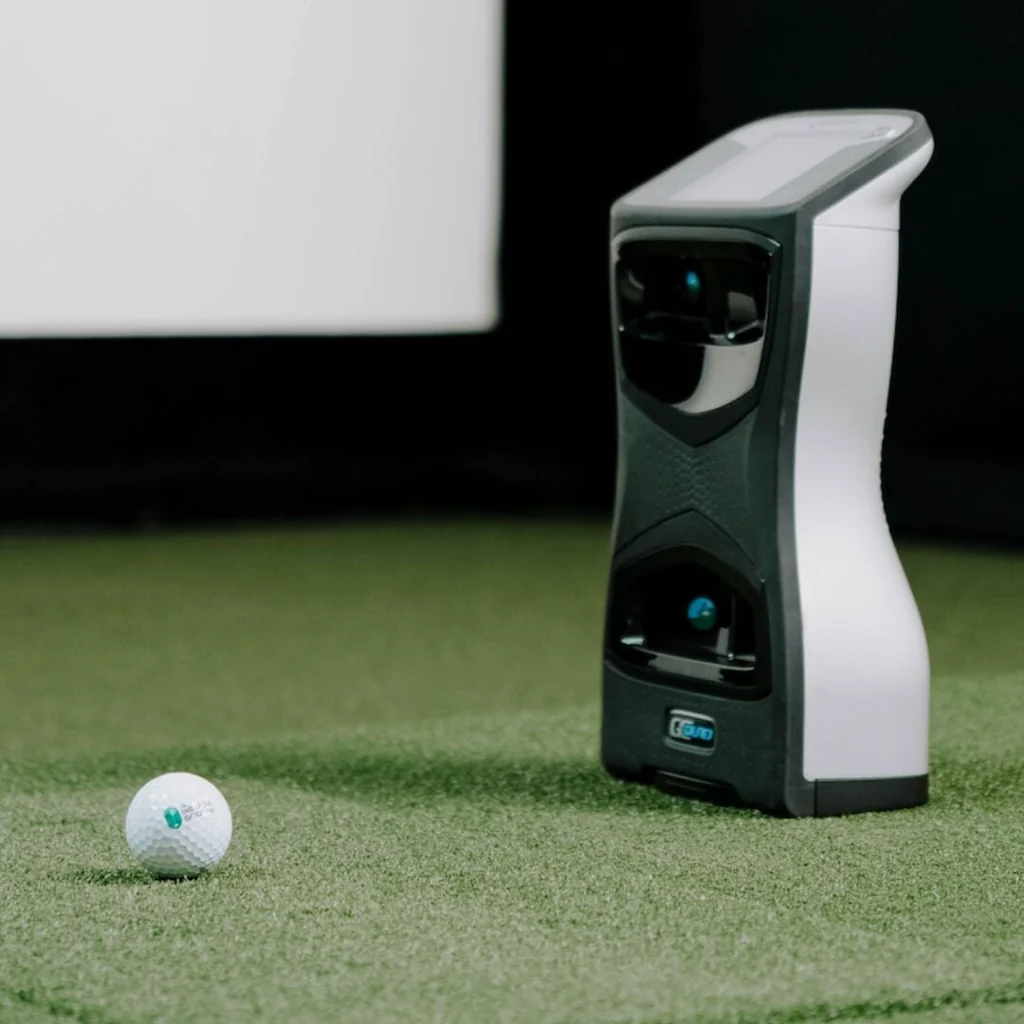
Foresight GC3S Review (2026)
If you are building in a tight space but want photometric ball tracking, this Foresight GC3S review breaks down whether the hardware fits your room.
This guide evaluates indoor ball data, small-room clearances, GSPro compatibility, and the true three-year ownership cost. It undercuts quad-camera units upfront, but the catch is subscription-gated software access and narrower club metrics.
Indoor accuracy comes first, because raw photometric precision is what you are paying for.
Accuracy: Indoor Ball Data and Club Tracking Limits
In a home simulator, your entire build is only as good as the numbers on screen. If a launch monitor guesses spin or miscalculates carry distance, you end up grooving a swing flaw instead of fixing one.
The Foresight GC3S delivers exceptional indoor ball data accuracy because it uses a three-camera photometric engine. Unlike radar monitors that need 10 to 12 feet of ball flight to calculate trajectory, the GC3S captures high-speed images at the moment of impact. Ball speed, launch angle, total spin, and side spin are measured directly. Across community testing on GolfSimulatorForum, ball data numbers closely mirror higher-end commercial overheads. For carry gapping and wedge spin indoors, it is rock solid.
Where the system shows its limits is in hitting zone management and club delivery depth.
The optical capture window is relatively small, roughly the size of a sheet of paper. If your hitting strip shifts, your tee height changes drastically, or you place the ball near the perimeter of the zone, you will encounter no-reads or missed spin captures. Pair it with a stable, non-shifting hitting mat to avoid constant misreads.
Club data also has a hard ceiling. While the GC3S measures clubhead speed, smash factor, angle of attack, and club path, it requires placing reflective fiducial stickers on your clubface. Even with stickers applied, it does not provide detailed face-to-path or dynamic face-angle metrics.
Who it matters for:
The Foresight GC3S is ideal for the home builder who prioritizes pinpoint ball flight and accurate yardage gaps in a compact space. It is the wrong choice for gearheads or club fitters who need complete club delivery data without stepping up to a four-camera unit.
Software and Setup: FSX Ecosystem, Subscriptions, and GSPro Reality
Software is where simulator satisfaction is won or lost. Hardware captures the shot, but the software dictates your daily experience, course library, and ongoing running costs.
In any Foresight GC3S review, the software story starts with the native FSX ecosystem. An active subscription unlocks FSX Play and FSX Pro for full simulation and club data analysis. Visually, FSX Play looks sharp on a capable gaming PC, but Foresight keeps this a closed, premium walled garden. Expanding your course catalog inside FSX gets expensive quickly compared to community alternatives.
For third-party simulation, the priority for most home builders is GSPro. Running GSPro with a GC3S requires routing shot data to your PC through a third-party connector workflow. You can check our breakdown of what launch monitors work with GSPro to see how this setup compares to native integrations. On a stable local network, shot latency is minimal and ball flight renders almost immediately.
There is an important catch you need to verify before buying. Because GSPro is not an official native integration on the GC3S, you rely on community-maintained bridge tools. Foresight firmware updates or subscription licensing adjustments can alter connector compatibility. Always confirm that the active firmware still supports third-party workflows before pulling the trigger.
If your subscription lapses, the device still functions as a standalone monitor. The built-in LCD screen continues to display raw ball data beside the mat. However, external PC software connections, course gameplay, and digital ranges shut down until you renew.
Who it matters for:
The GC3S fits golfers happy inside FSX or willing to maintain third-party bridges for GSPro. If you want guaranteed, un-gated GSPro out of the box, look elsewhere.
Space Requirements: Room Dimensions and Setup Clearance
Your room dimensions decide your launch monitor long before accuracy specs or software features enter the conversation.
The Foresight GC3S excels in compact footprints because it sits side-on, roughly two feet beside the ball. Unlike radar units that demand 7 to 9 feet behind the tee plus 10 feet of ball flight, an optical unit needs zero rear tracking clearance. This makes the GC3S a practical choice when planning a golf simulator for small rooms. While radar builds require 18 to 20 feet of total depth, a GC3S setup runs comfortably in 12 to 14 feet.
Device space is not the same as human swing space. You can shorten room depth, but you cannot shrink your swing arc. Two constraints catch tight-room builders off guard:
- Ceiling height: This is a golfer constraint, not a device spec. Validate clearance by taking full swings with your driver, factoring in your follow-through and your steepest miss swing.
- Hitting-surface stability: Camera systems require a consistent view of the strike zone. Shifting mats or loose hitting strips cause alignment drift, leading to false push-pull readings and dropped shots.
Small-Space Setup Checklist:
- Mark a permanent, repeatable ball placement spot on the turf.
- Keep the GC3S on a stable, level spot so floor vibrations do not alter the target line.
- Ensure any hitting strip sits completely flush with the surrounding stance deck.
Who it matters for:
Basement and single-bay garage builders deciding between photometric and radar hardware. If your room lacks the depth for Doppler radar tracking, this side-on form factor makes indoor simulation possible without sacrificing data quality.
Total Cost: Upfront Hardware vs. 3-Year Ownership Math
Sticker price is not the price of ownership. A launch monitor can look like a bargain at checkout, but software subscriptions and hardware extras quickly change the math. When planning your golf simulator total cost breakdown, the Foresight GC3S requires a realistic three-year projection.
The GC3S offers a lower entry price than fully unlocked commercial units, and your first year of software comes included. Keeping connectivity and simulation active in years two and three, however, requires an ongoing annual subscription.
| Cost Component | FSX-Only Path | GSPro Path |
|---|---|---|
| Hardware (Year 0) | Base Unit MSRP | Base Unit MSRP |
| Year 1 Software | Included | GSPro License (~$250) |
| Years 2-3 Software | Foresight Sub (~$500-$800/yr) | Foresight Sub + GSPro (~$750-$1,050/yr) |
| 3-Year Total Running Cost | Hardware + ~$1,000-$1,600 | Hardware + ~$1,750-$2,350 |
Your real expense follows two distinct paths:
- The FSX-First Owner: You stay inside the Foresight ecosystem, using the included first year and paying Foresight renewals starting in year two.
- The GSPro Owner: You face the common double-subscription reality. You must pay Foresight's subscription tier just to keep third-party connectivity unlocked, on top of the annual GSPro license.
Hidden hardware expenses also add up quickly. Running GSPro or FSX Play requires a dedicated gaming PC with a capable GPU, adding $800 to $1,500 if you do not already have one. Factor in club marker stickers, a protective stand, and a quality hitting strip.
Who it matters for: Budget-conscious buyers eyeing the GC3S as a shortcut to Foresight accuracy. If you plan to run GSPro over three years, subscription stacking and PC requirements can add $1,000 to $2,000 beyond your initial hardware budget.
Portability and Outdoor Use: Range Accuracy and Travel Reality
A launch monitor anchored permanently to your sim bay is a completely different tool than one you can pack for outdoor range sessions.
The Foresight GC3S handles portability well because of its self-contained design. With an internal battery providing four to five hours of runtime and a built-in display, you can set it beside the ball and hit immediately. You do not need a laptop, an iPad, or local Wi-Fi to capture basic numbers. For builders with a compact room setup who cannot leave hardware out permanently, pulling the unit off the mat in two minutes is a major practical win.
Taking a photometric camera system outdoors introduces real environmental constraints because optical lenses rely on clear contrast. While the GC3S performs reliably on covered ranges or under overcast skies, direct midday sunlight can overwhelm the sensors. Low-angle sun beaming straight into the lens apertures causes dropped shots or unread spin. If your primary goal is tracking long-game dispersion across wide-open grass ranges in harsh sun, Doppler radar units still hold an edge in raw consistency.
Ownership friction comes down to physical protection and power management. Never toss this unit loose into a golf bag. A drop or a bent leveling foot causes alignment drift that throws off indoor target lines, making a dedicated hard case mandatory. For marathon indoor sessions, keep a power cable run to the hitting mat so you are not chewing through battery charge cycles.
Who it matters for: Golfers who split practice between an indoor hitting bay and outdoor range stalls. If you want fast club gapping without lugging a laptop to the range, the built-in screen makes the GC3S exceptionally useful.
Foresight GC3S vs. GC3: The Upgrade Decision and Alternatives
This is the point in any Foresight GC3S review where the buying decision comes down to your financial time horizon. You are choosing between a lower upfront entry price with ongoing fees, an unlocked legacy unit, or a different platform altogether.
Under the shell, the GC3S and original GC3 share the exact same three-camera photometric engine. Both units deliver identical ball data precision, the same compact side-mounted footprint, and tour-grade indoor tracking reliability.
The real divide comes down to software licensing. As detailed in our Foresight GC3S vs GC3 breakdown, the GC3S functions as a cash-flow purchase tied to annual subscription fees. By contrast, the fully unlocked original GC3 required a steep upfront premium of around $7,000 to eliminate recurring software costs entirely.
At roughly $500 per year for software access, paying a steep upfront premium takes around four to six years to reach breakeven. If you plan to keep your launch monitor for seven or more years, an unlocked model is cheaper over its lifespan. If you prefer keeping cash in hand today, the GC3S spreads that expense across your ownership cycle.
If you are cross-shopping other hardware for a compact room, three alternatives stand out:
- Bushnell Launch Pro: Shares the exact same optical engine, serving as a lower-entry-cost sibling with tiered subscription options.
- SkyTrak+: A side-mounted photometric hybrid that fits tight rooms, available from SkyTrak as certified pre-owned (CPO) units.
- Garmin Approach R50: The self-contained alternative featuring a built-in touchscreen and native course play if you want to bypass a dedicated gaming PC.
Who this matters for:
Upgrade evaluators balancing long-term total cost of ownership against upfront liquidity, and golfers allergic to annual software subscriptions.
The Verdict: Is the Foresight GC3S Worth It?
The Foresight GC3S delivers gold-standard photometric ball tracking inside a compact footprint that fits basements and single garage bays where radar units fail. It gives you tour-grade ball speed, launch angle, and spin numbers right beside the hitting mat. However, this Foresight GC3S review comes down to an unavoidable tradeoff: software access is subscription-gated after year one, club data hits a hard ceiling without dynamic face-angle tracking, and third-party simulation requires ongoing maintenance.
| Category | Judgment |
|---|---|
| Accuracy and Data Quality | Pro-grade ball tracking. Spin, speed, and launch are measured directly with zero estimation, though club data lacks dynamic face angles. |
| Software & Subscription Lock | Restrictive. FSX runs cleanly, but external PC connections and third-party simulator access require active annual renewals. |
| Space Requirements | Outstanding. Side-mounted photometric cameras eliminate rear clearance demands, working comfortably in 12 to 14 feet of total room depth. |
| Total Cost of Ownership (3 Years) | Moderate upfront, high long-term. Annual subscriptions and gaming PC requirements push real three-year costs $1,000 to $2,300 above sticker price. |
| Portability & Outdoor Use | Very good. The built-in handle, battery, and LCD screen make range sessions easy, though harsh direct sunlight can challenge optical sensors. |
| Value vs. GC3 & Alternatives | Strong short-term liquidity play. It lowers the barrier to entry compared to an unlocked GC3, but long-term owners pay more past year five. |
Buy the GC3S If:
- You are building in a tight room and need dependable, tour-credible ball tracking that operates smoothly in 12 to 14 feet of total depth without rear clearance worries.
- You prioritize a lower upfront cost and prefer spreading software expenses across yearly operational fees rather than paying a massive upfront sum for an unlocked unit.
- You split practice between the bay and the driving range and want a self-contained unit with an integrated screen that works outdoors without dragging a laptop along.
Look Elsewhere If:
- You are subscription-averse and plan to keep your simulator build for six or more years, where an unlocked launch monitor eliminates recurring fees and saves money.
- You need deep club delivery metrics like face-to-path and dynamic face angle, which the three-camera photometric array cannot measure even with club markers applied.
- You want frictionless GSPro integration without paying double software subscriptions or relying on community-maintained connector tools to pass ball data.
Before purchasing, verify current Foresight subscription pricing, check community threads on the latest third-party connector stability, and ensure your PC GPU meets simulation requirements.
Frequently Asked Questions
Is the Foresight GC3S worth it in 2026?
The Foresight GC3S is worth it if you want tour-grade indoor ball data in a compact room and prefer lower upfront hardware costs over buying an unlocked unit outright. It is not worth it if you want to avoid annual subscriptions or need advanced club delivery data like face angle. For home builders working in 12 to 14 feet of depth, its photometric precision justifies the recurring fee.
Does the GC3S work with GSPro?
Yes, the Foresight GC3S works with GSPro, but it requires an active subscription tier and a community-maintained third-party connector workflow. Because GSPro is not an official native integration, you must run bridge software on your PC to pass shot data. Always verify current Foresight firmware and licensing policies before buying. See the software section above for the full connectivity breakdown.
What happens if I do not renew the subscription after year one?
If your subscription lapses, the GC3S still operates as a standalone launch monitor displaying basic ball data on its built-in LCD screen. However, all external PC connections, FSX Play simulation, third-party software feeds, and digital course play are disabled until you renew your annual plan.
How accurate is the GC3S compared to a GCQuad or Trackman?
The GC3S delivers ball data accuracy that is practically identical to the GCQuad and Trackman for indoor home simulator use. Ball speed, launch angle, and spin numbers match commercial systems within standard measurement tolerances. The higher-end units only pull away by providing dynamic face-angle metrics, larger hitting zones, and deeper club delivery analysis.
Foresight GC3S vs. GC3: which should I buy?
Buy the GC3S if you want to keep upfront cash expenses low and plan to own the system for less than five years. Buy an original unlocked GC3 if you want to avoid recurring subscription fees entirely and plan to keep your simulator build long enough to beat the five-year breakeven point.
Do I need club markers on the Foresight GC3S, and do they affect accuracy?
You only need reflective fiducial club markers if you want the GC3S to measure clubhead speed, angle of attack, and club path. Ball tracking accuracy is completely unaffected whether you use markers or not. If you do track club delivery, ensure markers are applied cleanly so the optical cameras do not drop readings.
Related Guides
FlightScope Mevo Gen 2 Review (2026): The Mevo+ Successor
Read our in-depth FlightScope Mevo Gen 2 review covering indoor accuracy, space requirements, GSPro setup, and true costs before you build your golf sim.
Best Golf Simulator Screen (2026): Impact Screen Materials & Size Guide
Find the best golf simulator screen for your space. Compare top options, reduce impact noise, and learn how to calculate exact room size and aspect ratio.
Golf Simulator Total Cost Breakdown: What You'll Actually Spend at Each Tier
How much does a golf simulator cost? Discover the real numbers behind 5 realistic pricing tiers, hidden fees, and multi-year ownership costs in 2026.