
Bushnell Launch Pro vs SkyTrak+: Same Tech, Very Different Price

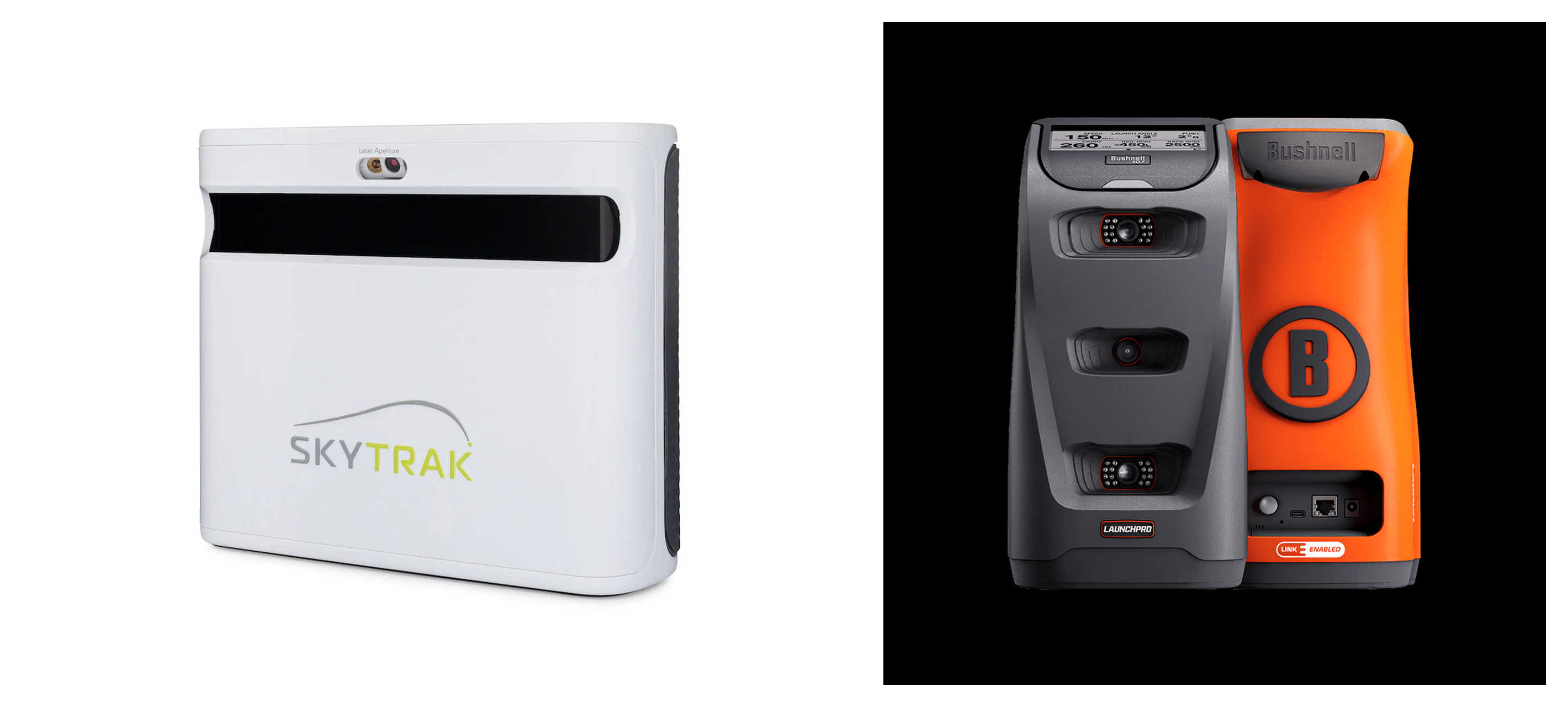
Bushnell Launch Pro vs SkyTrak+ (2026): Which Should You Buy?
Deciding on the Bushnell Launch Pro vs SkyTrak+ comes down to workflow, not tracking accuracy. Sharing the Foresight GC3 optical engine, they are closer in performance than the price gap suggests. The Launch Pro wins if you want tour-grade data via PC and subscriptions. The SkyTrak+ wins for software simplicity and lower overhead. You will soon know which fits your room, software choice, and 3-year cost.
See the SkyTrak+ setup guide and GSPro compatibility list to plan your build.
Indoor Accuracy and Real-World Usability Compared
When building a dedicated home simulator, you are not looking for "close enough." You want repeatable carry numbers, reliable spin rates, and an indoor ball flight that matches the golf course. The biggest misconception in the Bushnell Launch Pro vs SkyTrak+ debate is that the higher price of the Launch Pro automatically buys you vastly superior indoor ball-flight accuracy. It does not.
Both are photometric launch monitors that sit to the side of the ball, capturing high-speed images of impact for high indoor accuracy. The Bushnell Launch Pro uses the same underlying optical engine as the $7,000 Foresight GC3, a tour-validated standard. Yet, in real-world testing, the SkyTrak+ keeps pace closely on basic ball data like ball speed, launch angle, and spin. If both are set up correctly, they deliver nearly identical carry distances.
The experience diverges in day-to-day use. The Bushnell Launch Pro is the industry gold standard for consistency. Misreads are incredibly rare, and the unit is highly forgiving of minor ball placement or lighting shifts. If you are mapping wedges or dialing in yardages, this level of reliability is what you pay for.
However, there is a catch with the Launch Pro club data. To track club path and face angle, you must apply reflective silver stickers to your clubface. Without these stickers, the cameras only read ball data. This creates continuous friction because you must buy stickers, align them carefully, and replace them when they wear off.
The SkyTrak+ takes a different path. It is a camera-radar hybrid that uses dual Doppler radar to measure club data. This means you get club path and face angle metrics without putting a single sticker on your club. It is a zero-friction setup for quick practice sessions.
The tradeoff is in the user interface. While the shot delay is much better than the original SkyTrak, there is still a noticeable pause of one to two seconds before the ball flies on your screen. Furthermore, because SkyTrak+ units are only available as Certified Pre-Owned (CPO) models as of 2026, there is some community-reported unit variance. Some owners report flawless performance, while others struggle with occasional misreads or finicky connection issues.
Because both are side-mounted camera units, they share a major advantage over radar-only competitors like the FlightScope Mevo+ or Garmin R10. They require very little room depth. You do not need eight feet of space behind the ball to track the flight. You can run either unit in a room with just 10 to 12 feet of total depth, whereas radar units demand 16 to 18 feet.
What actually causes poor accuracy on these units is setup error. Bad physical alignment to your target line, uneven hitting mats that cause the device to sit higher or lower than the hitting surface, shadows from overhead lights, or highly reflective objects in the background cause misreads on both devices.
The choice comes down to your personal tolerance for friction. If you want a commercial-grade, highly reliable ball-flight experience where you never doubt a number and you do not mind using club stickers, this criterion favors the Bushnell Launch Pro. If you value instant club data without stickers and you do not mind a slight shot delay or the setup sensitivity of a CPO unit, the SkyTrak+ is the better fit.
Bushnell Launch Pro vs SkyTrak+: Software Compatibility and Workflow
Most home simulator frustration has nothing to do with hardware accuracy. The real test is the weekly friction of turning the system on, connecting devices, and starting a round without troubleshooting. This is why you must choose your primary simulation software first, then select the launch monitor that supports it cleanly. If you reverse this order, you risk buying hardware that locks you out of the software experience you actually wanted.
The Bushnell Launch Pro is built for a high-end PC environment. It includes FSX Play, Foresight's native simulation software, which offers stunning graphics but demands a serious gaming PC with a dedicated graphics card like an Nvidia RTX 3060 or better. If your main computer is upstairs and your simulator is in the garage, you face the headache of streaming software or running long HDMI cables. This multi-step process requires a dedicated computer setup, a tedious booting workflow, and a $499 per year Gold subscription to unlock third-party connections.
The SkyTrak+ takes a simpler, multi-device approach. Its native software is a highly polished practice suite featuring bag mapping, a wedge matrix, and shot optimizer features. Unlike the PC-bound Launch Pro, the SkyTrak+ app runs natively on an iPad, Mac, or PC, making it incredibly convenient for quick garage sessions. Keep in mind that using a lower-powered iOS device instead of a PC can increase shot delay, as tablet processing speeds directly impact how quickly the ball flight renders.
When it comes to third-party software, both devices support GSPro and E6 Connect, but the path to get there differs. To run GSPro on the Bushnell Launch Pro, you need a gaming PC and the $499 per year Gold subscription to allow the data connection. While this official connection is highly stable, it carries a steep annual cost on top of the GSPro fee. The SkyTrak+ also supports GSPro on PC via their $240 per year Play subscription, and you can compare connection steps on our updated [GSPro compatibility list]https://buildagolfsim.com/guides/what-launch-monitors-work-with-gspro-2026).
For E6 Connect, the SkyTrak+ offers a major advantage for mobile users since it can run E6 directly on an iOS device. The Launch Pro requires the PC version of E6, meaning you cannot escape the gaming computer requirement. Setting up either unit has its quirks, but as detailed in our SkyTrak+ setup guide, the initial hurdle is often simpler on the SkyTrak+ due to its friendly mobile interface. If you hate managing Windows updates and graphics drivers before you play, this difference is massive.
Your software priority should dictate your choice in the Bushnell Launch Pro vs SkyTrak+ debate. If you want a permanent, high-end simulator room centered around a gaming PC, and you plan to run FSX Play or GSPro at maximum resolution, the Bushnell Launch Pro is the better platform. If you prefer a simpler, lower-maintenance setup where you can practice on an iPad without a heavy computer footprint, the SkyTrak+ ecosystem is the smarter choice.
Bushnell Launch Pro vs SkyTrak+: Total Cost of Ownership
Most home buyers fixate on the upfront launch monitor price tag, only to get blindsided by subscriptions, software licenses, and PC hardware. While the Bushnell Launch Pro and SkyTrak+ initial hardware costs seem comparable, their total three-year costs look completely different once you build a fully functioning setup.
The Bushnell Launch Pro carries an MSRP of $2,499 for the ball-data-only unit. While hardware prices fluctuate with promotions, this baseline serves as your starting point.
For the SkyTrak+, the landscape shifted in 2026. New retail units are discontinued, meaning the only official purchase path is through Certified Pre-Owned (CPO) inventory. This drops your initial hardware cost to $1,995, but you get refurbished hardware with a shorter warranty and lower resale value down the road.
Subscriptions represent the next major cost. To use the Bushnell Launch Pro with third-party software like GSPro, you must pay $499 per year for the Gold package just to unlock the data ports. The SkyTrak+ is friendlier, requiring its $240 per year Play subscription to connect to third-party platforms, which saves you $259 annually.
Then there is the computer hardware. Foresight FSX Play demands a high-end gaming PC with a powerful dedicated GPU, meaning you must budget at least $1,200 for a desktop to run the Launch Pro. The SkyTrak+ can bypass this expense entirely because its native software and basic E6 packages run on iOS using an iPad you already own. If you do choose to run GSPro on the SkyTrak+, you still need a PC, but you can get by with an $800 mid-tier machine because you do not have to power FSX Play.
| Build Profile | Launch Monitor | Subscriptions (3 Years) | Software License (3 Years) | PC / Device Cost | Total 3-Year Cost |
|---|---|---|---|---|---|
| Native Ecosystem | Launch Pro ($2,499) | $0 (Basic FSX Play) | $0 (Included) | $1,200 (Gaming PC) | $3,699 |
| Native Ecosystem | SkyTrak+ CPO ($1,995) | $387 ($129/yr Game Imp.) | $0 (Included) | $0 (Existing iPad) | $2,382 |
| GSPro-First | Launch Pro ($2,499) | $1,497 ($499/yr Gold) | $750 ($250/yr GSPro) | $1,200 (Gaming PC) | $5,946 |
| GSPro-First | SkyTrak+ CPO ($1,995) | $720 ($240/yr Play) | $750 ($250/yr GSPro) | $800 (Mid-tier PC) | $4,265 |
| E6-First | Launch Pro ($2,499) | $1,497 ($499/yr Gold) | $900 ($300/yr E6) | $1,200 (Gaming PC) | $6,096 |
| E6-First | SkyTrak+ CPO ($1,995) | $720 ($240/yr Play) | $900 ($300/yr E6) | $0 (Existing iPad) | $3,615 |
These numbers show a significant gap. If the three-year cost of these setups exceeds your planned budget, our $3K budget guide can help you find alternative hardware packages that fit your financial boundaries.
This economic comparison does not produce a single winner. If you already own a capable gaming PC and prioritize tour-grade club data reliability with GSPro, the Bushnell Launch Pro is worth the premium. The extra investment gets you a brand-new unit and highly consistent club metrics.
Conversely, if you want to avoid buying a dedicated PC and prefer running a mobile setup on an iPad, the SkyTrak+ is the better spend. Despite the CPO-only purchase path, it keeps your three-year overhead significantly lower.
Which Should You Buy? The Verdict on Bushnell Launch Pro vs SkyTrak+
Comparing the Bushnell Launch Pro vs SkyTrak+ reveals that accuracy is a wash; both photometric systems deliver tournament-grade ball data. The real separation lies in software workflow, hardware setup friction, and the subscription model you want to fund. One is a high-octane PC engine, while the other is a streamlined, mobile-friendly practice tool.
For the Dedicated Indoor Room Seeking Lowest Friction
If you want a simulator that boots up instantly without a high-end gaming PC, the SkyTrak+ is the stronger pick. Running its practice suite and E6 Connect directly on an iPad means you can start hitting within a minute. It also delivers club data without forcing you to stick metallic dots on your clubfaces. Keep in mind that as of 2026, the SkyTrak+ is only available as a certified pre-owned unit.
For the High-End Room Prioritizing Maximum Reliability
If you already own a gaming PC and want zero-tolerance reliability, the Bushnell Launch Pro is the clearer choice. Its underlying Foresight optical engine is incredibly consistent, eliminating the rare misreads or shot delays found in cheaper systems. You must use club stickers to get club data, but in exchange, you get professional-grade FSX Play simulation.
For the GSPro-First Gamer
The GSPro-first buyer should choose based on budget vs connection stability. The SkyTrak+ is the cheaper path because its $240 annual subscription is far lower than the $499 yearly Gold tier Bushnell requires to unlock third-party software. However, the Launch Pro provides a more stable connection to your PC. Choose the SkyTrak+ to save on long-term subscription fees, or the Launch Pro if you prioritize native, drop-free connectivity.
For the Outdoor Range User
Do not expect perfect performance outdoors, as direct sunlight can blind the cameras on both units. If you must transport your device to the range, the Bushnell Launch Pro is the less frustrating option due to its built-in display screen and superior outdoor tracking engine. For heavy outdoor use, however, you should consider a radar-based monitor instead.
The Quick Tie-Breaker Checklist
- Do you want to run a gaming PC in your simulator room? If no, choose the SkyTrak+.
- Do you hate high subscription costs more than setup friction? If yes, choose the SkyTrak+.
- Do you mind applying physical stickers to your club faces? If yes, choose the SkyTrak+.
- Is a brief shot delay a deal-breaker for your immersion? If yes, choose the Launch Pro.
Your next step is to finalize your software path.
Bushnell Launch Pro vs SkyTrak+: Frequently Asked Questions
Are the Bushnell Launch Pro and SkyTrak+ basically the same hardware?
No, they are built on completely different hardware platforms. The Bushnell Launch Pro uses the professional Foresight GC3 photometric engine to track the ball and club. The SkyTrak+ is a camera and radar hybrid designed by SkyTrak. While both sit beside the ball and measure launch and spin, they use different software ecosystems, connection workflows, and subscription gates to unlock their features. Note that the Launch Pro requires physical stickers on the clubface to track club data, while the SkyTrak+ measures club path using its built-in radar.
Which is better for GSPro in 2026?
Neither is universally better, but the choice depends on whether you prefer lower annual fees or native connection stability. The SkyTrak+ is the cheaper path because its required connection tier costs $240 per year, compared to the $499 per year Gold subscription required by the Bushnell Launch Pro. However, the Launch Pro offers a more stable native connection to your gaming PC.
What does each one cost over 3 years with subscriptions?
The three-year total cost of ownership is roughly $5,946 for a GSPro-focused Bushnell Launch Pro setup compared to $4,265 for a comparable SkyTrak+ setup. These figures include hardware, required subscription tiers, software licensing, and the necessary PC hardware. Always verify current subscription tiers directly with the manufacturers at the time of purchase as pricing policies change.
Do I need a gaming PC for FSX Play or SkyTrak software?
You need a dedicated gaming PC with a strong graphics card like an Nvidia RTX 3060 to run FSX Play on the Bushnell Launch Pro. The SkyTrak+ native software can run easily on an iPad or Mac, meaning you can bypass the PC cost entirely if you do not use GSPro.
Is SkyTrak+ still CPO-only, and should that worry me?
Yes, SkyTrak+ is only sold as Certified Pre-Owned (CPO) as of 2026, but this should not worry you if you buy through official channels. CPO units are fully inspected, refurbished, and typically come with a manufacturer warranty. Just ensure you buy from a reputable seller and verify their return policy before purchasing to manage any unit-to-unit variance.
Does SkyTrak+ have shot delay, and is it fixable?
Yes, the SkyTrak+ has a brief shot delay of one to two seconds, and while you cannot eliminate it, you can minimize it. You can reduce the delay by using a wired USB connection instead of Wi-Fi, running a stronger host PC, or lowering your software graphics settings. A minor delay is normal for optical launch monitors in this class and is a matter of personal preference.
Related Guides
Bullseye 3D Golf Mat Review (2026): The New Budget Divot-Feel Mat
Read our Bullseye 3D golf mat review to see how it handles joint shock, launch monitor accuracy, and long-term durability. Learn if it fits your sim setup.
Uneekor EYE XR Review (2026): Overhead Launch Monitor for Home Sims
Read our honest Uneekor EYE XR review covering accuracy, room space requirements, GSPro costs, and whether this overhead launch monitor fits your home setup.
Rapsodo CLMPRO: First Look at the Overhead Six-Camera Launch Monitor
Wondering if the Rapsodo CLMPRO is worth waiting for? Explore confirmed prototype specs, ceiling clearance needs, GSPro compatibility, and ownership costs.