
Uneekor EYE XR Review (2026): Overhead Launch Monitor for Home Sims

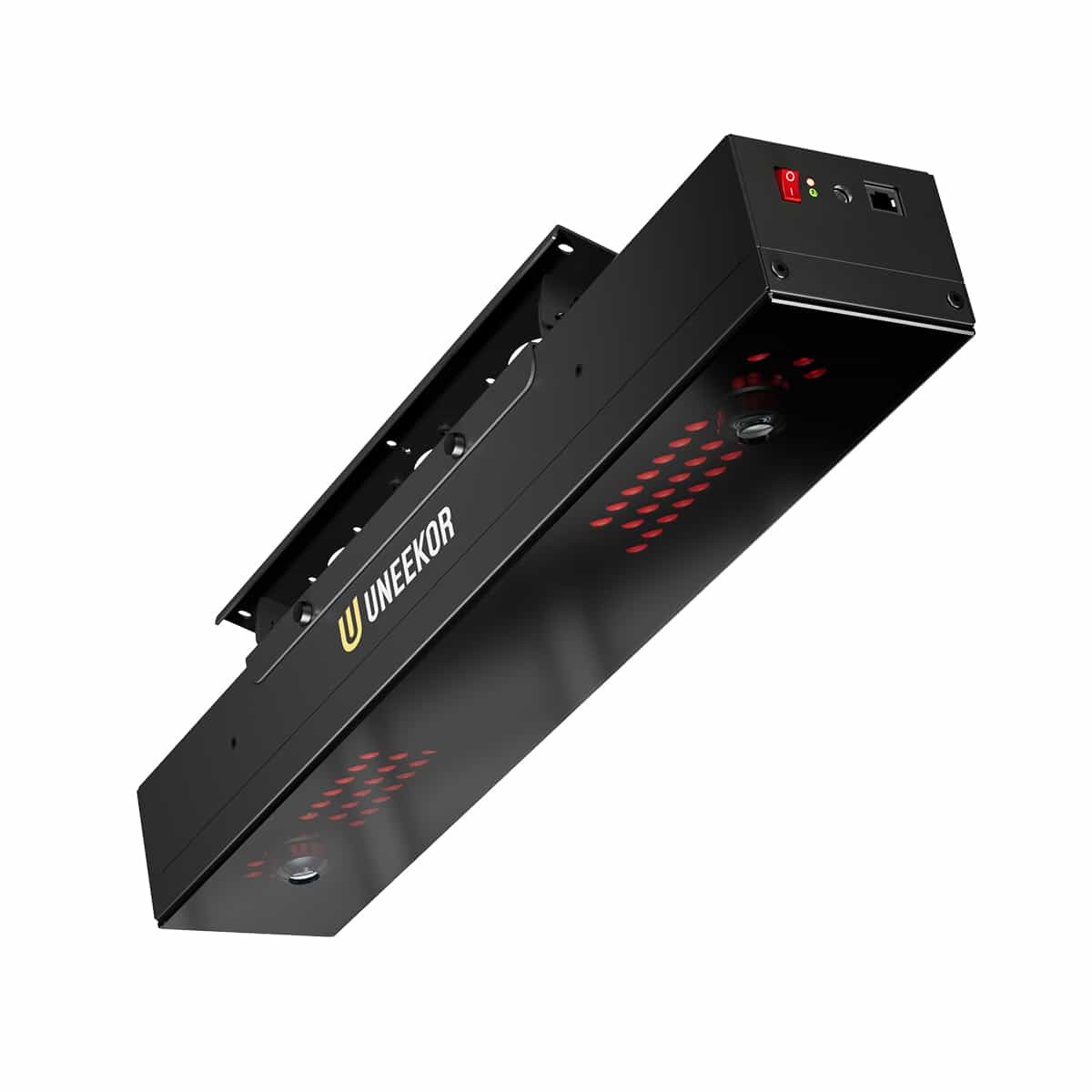
Uneekor EYE XR Review (2026): Is It Worth It?
Overhead launch monitors clear floor clutter and make lefty-righty play simple. But as this Uneekor EYE XR review covers, ceiling mounts demand strict ceiling height and exact mount geometry.
The XR is not an EYE XO2 for less. The tradeoff is a smaller hitting zone and fewer measured club metrics.
This review covers accuracy, space math, software costs, and who should step up to the XO2. Start with data quality, because if the numbers fail, the install does not matter.
Accuracy and Ball Data: How Reliable Is the EYE XR?
You are buying data, not a mounting bracket. If an overhead optical unit misreads spin or drops shots, a clean floor and easy left-right switching mean nothing. Fortunately, the Uneekor EYE XR delivers reliable core metrics, though it comes with physical operating quirks you must respect.
On irons and wedges, ball data is rock-solid. Ball speed, launch angle, and carry distance match up cleanly against high-end photometric benchmarks. Spin readings on clean strikes are consistent, meaning your approach shots hold greens in simulation just like they do on turf.
Driver numbers require a slight sanity check. Overhead cameras capture high-speed impact well, but severe heel or toe strikes occasionally produce exaggerated gear-effect curves. Ball speed remains trustworthy, but high-speed shot shapes can look slightly more dramatic on screen than in reality.
Short game performance is generally strong, with chip shots launching and checking predictably. Putting, however, is where overhead optical systems face their biggest test. While standard putts register smoothly, ultra-slow rolls under three miles per hour and minor off-line pushes can cause missed reads. Spend time testing your putting surface during your return window.
The real daily friction is the hitting zone. The EYE XR gives you a tight capture box of roughly 14 inches by 12 inches. If your ball placement drifts even slightly outside that window, you get a dead swing. To prevent constant misreads when friends come over, plan to mark your hitting mat with alignment marks or subtle physical guides.
Club data also comes with a caveat. Tracking your swing without club stickers is a huge quality-of-life win, but some delivery metrics, including face angle, are calculated rather than directly measured. Casual golfers playing virtual rounds will never care. Club fitters, coaches, and swing purists chasing exact face-to-path truth will find this limiting.
Accuracy is a strength, but the XR demands discipline in ball placement and it is not the best choice if you are paying for measured club-delivery truth.
Space and Mounting: Real Room Requirements for the EYE XR
Overhead launch monitors solve floor clutter, but they can easily fail the room-fit test. The Uneekor EYE XR only works if you have the clearance to swing driver freely and the structural layout to hang the sensor where it demands to be.
On paper, spec sheets often suggest a 9-foot minimum ceiling. In reality, your swing dictates room geometry. An upright driver follow-through routinely clips drywall under 9.5 feet. Check the minimum ceiling height you actually need for a golf simulator before buying, and treat 9.5 to 10 feet as the true working floor.
Mounting geometry introduces another constraint. The EYE XR mounts overhead roughly 2 to 3 feet behind the ball. In a shallow room, pushing the hitting zone forward to make space for the unit eats into your screen buffer, increasing bounce-back risk.
Where the EYE XR shines is mixed-handed households. Because the unit tracks from above, lefties and righties play together seamlessly without moving hardware or swapping hitting strips.
Offset hitting is where builders get trapped. If room width forces you off-center to clear a wall or garage door track, the sensor must shift too. You cannot center-mount the unit and hit from the side because the camera lenses must align directly above your intended target line.
Watch for these ceiling edge cases before drilling:
- Angled ceilings or duct soffits: Cameras must sit parallel to the floor, requiring a level mounting bracket or Unistrut.
- Ceilings over 10.5 feet: You will need a drop mount to keep the sensor within its optimal optical tracking window.
- Shiny surfaces and direct lighting: Downlights right above the hitting zone blind the high-speed cameras. Keep bright fixtures outside the tracking area.
If your ceiling is under 9 feet, do not assume it fits. At 9.5 to 10 feet, you are in the viable zone, but measure your real driver swing clearance and map the mount before ordering.
Software and Subscriptions: Running GSPro and Uneekor VIEW
The BAGS rule for any build is simple: pick your software first, then buy the hardware that runs it. Retailers love marketing overhead monitors as all-in-one simulators, but the software layer determines your true ongoing costs and daily experience.
Out of the box, the Uneekor EYE XR runs native Uneekor VIEW and GameDay software. For driving range practice, club fitting analysis, and high-speed clubface video, VIEW is exceptionally capable. Shot traces render instantly, club delivery numbers are clean, and the interface excels at structured practice.
Where buyers get blindsided is third-party simulation: virtual courses on GSPro or E6 Connect do not work out of the box. Uneekor locks third-party connector access behind paid subscription tiers. To run GSPro or E6 Connect, you pay Uneekor an annual fee to unlock the connector, then pay for your GSPro membership ($250 per year) or E6 licensing separately. Check our breakdown of what launch monitors work with GSPro to see how this connector overhead compares across brands.
Hardware networking adds another layer to plan for. The EYE XR uses Power over Ethernet (PoE). Running Cat6 from your ceiling mount to a PoE injector or network switch is cleaner than hanging USB cables, but it requires routing and a dedicated network port. Calibration is straightforward: lay the included calibration board flat on your turf inside the hitting zone, let the cameras align, and verify target line zero matches your screen center.
Keep your PC specs in mind. Overhead high-speed camera playback alongside modern course graphics demands serious hardware, especially if you project in 4K. Budget for a dedicated Windows gaming desktop running at least an Nvidia RTX 3060 or better so you do not drop frames during high-speed impact review.
The EYE XR is a strong software ecosystem choice if you are comfortable paying for the connector tier. If you want zero subscriptions and minimal PC dependence, look at different product families.
Total Cost of Ownership: 3-Year Math and Hidden Expenses
Street pricing for the Uneekor EYE XR typically falls between $4,500 and $5,000, depending on retail packages and promotional timing. Confirm current figures with authorized retailers before locking down your budget.
Buying an overhead launch monitor involves more than the initial hardware invoice. A realistic budget must account for recurring platform fees, simulation licenses, a gaming PC, and overhead mounting hardware. For a complete room budgeting framework, see our golf simulator total cost breakdown. Here is what three years of EYE XR ownership realistically costs across common software paths:
| Expense Category | Uneekor VIEW Only | VIEW + GSPro | VIEW + E6 Connect |
|---|---|---|---|
| Hardware Purchase | $4,500 - $5,000 | $4,500 - $5,000 | $4,500 - $5,000 |
| Uneekor Third-Party Connector | $0 | $600 ($200/yr) | $600 ($200/yr) |
| Simulation Software (3 Yrs) | $0 | $750 ($250/yr) | $900 - $1,800 ($300-$600/yr) |
| Dedicated Windows PC | $900 - $1,400 | $900 - $1,400 | $900 - $1,400 |
| Overhead Install Accessories | $150 - $250 | $150 - $250 | $150 - $250 |
| 3-Year Estimated Total | $5,550 - $6,650 | $6,900 - $8,000 | $7,050 - $9,050 |
That installation accessory line catches many first-time overhead buyers off guard. Budget for a PoE injector or network switch, long Cat6 Ethernet cabling, ceiling cable raceways, mounting brackets or Unistrut, and alignment tape or chalk to mark the compact hitting zone on your mat. E6 pricing also varies by tier, ranging from basic course subscriptions to expanded commercial licenses.
Compared to the flagship EYE XO2, the XR saves thousands on the initial hardware purchase. What you give up is the XO2's generous 28-by-12-inch hitting zone and richer measured club data. The bad buy scenario happens when you spend heavily on software add-ons and premium PC gear, approaching XO2 money while remaining locked into the XR's tighter 14-by-12-inch hitting window.
The EYE XR is strong value if you truly want overhead and you accept the subscription reality. It is weaker value if you will resent annual fees or you need the larger, more forgiving hitting zone.
Uneekor EYE XR Review Verdict: Should You Buy It?
The Uneekor EYE XR succeeds at bringing the clean floor and ambidextrous play of an overhead launch monitor down to a more accessible budget. It tracks ball flight reliably and eliminates floor clutter. However, you are not buying a discounted flagship. Uneekor achieved this lower entry price with a notably compact hitting zone and calculated estimates for key club metrics.
| Category | Judgment |
|---|---|
| Ball Data Accuracy | Reliable on irons and wedges. Driver spin can drift on toe strikes, and short putts require proper lighting. |
| Club Data Depth | Good for casual practice, limited for club fitting. Path is tracked, but face angle is calculated rather than measured. |
| Space Fit | Demanding overhead. Requires 9.5 to 10 feet of real vertical clearance and unobstructed space behind the tee. |
| Software & Compatibility | Native VIEW software works well. Connecting to third-party tools like GSPro requires an annual Uneekor connector fee. |
| Ease of Ownership | Outstanding daily workflow. Reads standard golf balls and unmarked clubs with no battery charging or stickers. |
| Total Cost of Ownership | Moderate to high. Upfront hardware savings fade once you factor three years of connector fees, software licenses, and a capable PC. |
Before deciding, face the primary hardware weakness head on: the hitting zone is small. Measuring roughly 14 inches by 12 inches, it is roughly half the surface area of premium overhead units. If you place the ball outside that boundary, the cameras will ignore the swing. You cannot drop a ball carelessly during casual play. You must mark your mat and position the ball inside the capture zone every single shot.
Buy It If:
- You want overhead clearance on a budget: You want an open hitting deck that lets lefties and righties play together without shifting hardware.
- You demand a zero-friction workflow: You want to hit your preferred golf balls with clean clubfaces and avoid charging launch monitor batteries.
- You have budgeted for recurring software fees: You accept paying Uneekor an ongoing connector subscription alongside your third-party simulation licenses.
Look Elsewhere If:
- Your ceiling height is borderline: If your ceiling is under 9.5 feet, or if garage tracks and soffits sit overhead, mounting the unit safely becomes difficult.
- You host high-traffic sim nights: The tight 14-by-12-inch hitting box will frustrate beginners and kids who struggle with precise ball placement.
- You need measured club-face truth for coaching: Calculated face angles cannot replace measured data for serious fitting. Step up to the Uneekor EYE XO2 for fully measured club metrics and a wider hitting window.
Before spending anything, grab a tape measure. Check your actual ceiling height at the mount location, choose your primary simulation software first, and calculate your true three-year ownership cost before placing an order.
Frequently Asked Questions
Is the Uneekor EYE XR worth it for a home simulator in 2026?
Yes, the Uneekor EYE XR is worth it if you want the clean floor and left-right versatility of an overhead monitor without paying flagship prices. It makes sense if you have at least 9.5 feet of ceiling height and play regularly with mixed-handed golfers. However, it is not worth it if you dislike ongoing subscriptions, or if casual guests will get frustrated by the strict ball placement required by its compact 14-by-12-inch hitting box.
What ceiling height do I actually need for an EYE XR?
You need a working ceiling height between 9.5 and 10 feet. While spec sheets list a 9-foot minimum, a full driver follow-through routinely clips drywall or garage door tracks in rooms under 9.5 feet. The sensor also hangs down several inches, making ceiling obstructions like soffits or garage openers a hazard. Measure your actual swing with your longest club before buying, and refer to our ceiling height guide above for clearance math.
Does the EYE XR work with GSPro?
Yes, the EYE XR works with GSPro, but third-party integration is not free out of the box. You must pay an ongoing annual subscription to Uneekor to unlock third-party connector access, which costs around $200 per year. On top of that fee, you must purchase the annual GSPro software license ($250 per year) and run it on a dedicated Windows PC equipped with a capable graphics card.
Does the EYE XR require marked balls or club stickers?
No, the EYE XR tracks standard golf balls and unmarked clubs without special dots or reflective stickers. You can hit your preferred gamer ball straight out of the box. The tradeoff for sticker-free play is data depth. While the system measures ball data and club path directly, face angle and impact location metrics are calculated mathematically rather than directly captured.
EYE XR vs EYE XO2: Which should I buy?
Buy the EYE XR if your priority is saving several thousand dollars on an overhead setup and you can live with a smaller 14-by-12-inch hitting zone. Step up to the EYE XO2 if you need a generous 28-by-12-inch hitting window, require fully measured club-face data for coaching and fitting, or host frequent group rounds where players struggle with exact ball placement.
What are the hidden costs of owning an EYE XR?
The hidden costs of an EYE XR add roughly $2,000 to $3,000 beyond the initial hardware purchase over three years. Essential extras include a dedicated Windows gaming PC ($900 to $1,400), recurring Uneekor connector fees ($200 per year), simulation software like GSPro ($250 per year), and Power over Ethernet (PoE) accessories including Cat6 cabling, switches, and ceiling mounts ($150 to $250).
Related Guides
Rapsodo CLMPRO: First Look at the Overhead Six-Camera Launch Monitor
Wondering if the Rapsodo CLMPRO is worth waiting for? Explore confirmed prototype specs, ceiling clearance needs, GSPro compatibility, and ownership costs.
Bushnell LPi Review (2026): Bushnell's New Launch Monitor
Our Bushnell LPi review breaks down accuracy, software fees, and bay setup. Find out if this budget indoor launch monitor is worth the recurring costs.
Foresight GC3S Review (2026): The Updated Photometric Standard
Read our in-depth Foresight GC3S review to explore indoor accuracy, GSPro integration, space requirements, and the true 3-year cost of ownership.