
Bushnell LPi Review (2026): Bushnell's New Launch Monitor

Bushnell LPi Review (2026): Where It Fits in the Launch Pro Line
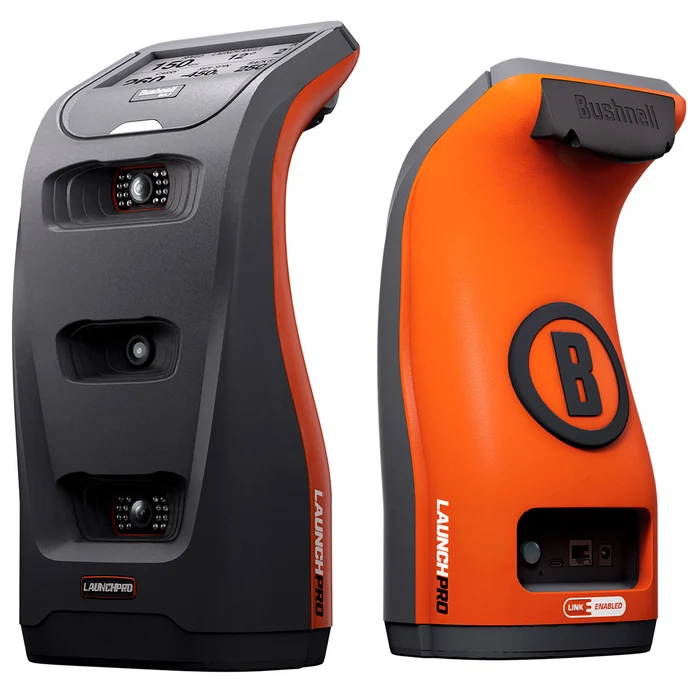
This Bushnell LPi review comes down to a single trade. Bushnell took the Launch Pro, stripped out the internal battery and onboard display, and lowered the upfront price for permanent indoor sim bays.
The catch is not ball-tracking accuracy. It is living with a mandatory power cord and recurring subscription fees to unlock FSX or GSPro. Here is whether that tradeoff fits your room, software plans, and three-year budget, starting with accuracy.
Bushnell LPi Accuracy: Ball Data Consistency and Club Tracking Reality
If this Bushnell LPi review cannot confirm identical indoor numbers to a Bushnell Launch Pro or Foresight GC3, nothing else about the device matters.
The baseline verdict is clear: on raw ball data, it delivers. The LPi uses the same three-camera photometric measurement system found across the Launch Pro family. It directly measures ball speed, launch angle, direction, and total spin axis at impact rather than estimating downrange decay. Deciding between the LPi and Launch Pro is not an accuracy debate, but a choice between a ceiling-mounted fixture and floor portability.
Where owners encounter friction is hitting zone discipline. The read area is roughly 7 by 10 inches, requiring you to place the ball cleanly in the capture window on every swing. Stray outside that box or aim at an awkward angle, and you get the classic optical failure mode: an outright no-read. Environmental factors matter just as much. Direct overhead spotlights shining into the lenses disrupt reads, while a hitting mat sitting taller than the unit base causes phantom misreads until you level the surface.
Then there is the reality of club tracking. While ball data tracks cleanly on any standard white ball without markings, meaningful clubhead metrics require reflective face stickers. Angle of attack, club path, and impact location depend entirely on an adhesive dot applied to the clubface. For solo practice with your own set, applying stickers is a one-time chore.
Multiplayer sim sessions are where the friction spikes. When friends visit to play a round, you either pause the session to sticker every iron or accept ball-only play for the evening.
The Verdict on Accuracy: Dedicated golfers grinding on an indoor range who want tour-grade ball metrics will be thrilled. Bay owners who frequently host guests or refuse to put stickers on their clubs will find the workflow annoying.
Bushnell LPi Software and Setup: Connecting to GSPro and FSX
For most buyers, choosing the Bushnell LPi is fundamentally a software decision disguised as hardware. Because the unit has no built-in screen or battery, it cannot operate in isolation. Its value lives or dies on which platform you plan to run and how much recurring subscription overhead you can stomach.
Here is the unfiltered reality of the software ecosystem:
If you want GSPro: You must budget for two separate recurring costs: the GSPro license itself and Bushnell's paid subscription tier to unlock third-party software connections. There is no backdoor connection or free bypass. If GSPro is your destination, that annual unlock fee is mandatory.
If you stick with Foresight FSX: The baseline entry tier covers basic practice tools and driving range data. If you want full course play on FSX Play or FSX 2020, you have to upgrade to Bushnell's higher annual tier. You cannot buy the hardware at its lower entry price and expect free full-course simulation.
Before mounting the unit, factor in two setup requirements:
- PC Hardware: The LPi offloads all graphics rendering to an external computer. Check what kind of PC GSPro actually needs before buying, because an underpowered office laptop cannot handle modern simulator engines.
- Tethered Connectivity: Connect the unit directly using USB or Ethernet. Wi-Fi works for initial configuration, but a hardwired line is essential to prevent dropped connections and lost shots in a dedicated bay.
This subscription logic matches the Bushnell Launch Pro, but the LPi changes the dynamic. A Launch Pro owner can take their monitor outdoors and read ball data off the top display without an active plan. The LPi is permanently wired to a PC, which makes software paywalls feel unavoidable.
The Software Verdict: Best for simulator builders who accept annual software fees as standard operating costs. Not for subscription-averse golfers seeking a one-time hardware transaction.
Bushnell LPi Space Requirements: Bay Dimensions and Room Integration
A launch monitor that does not physically fit your room is not almost right. It is an immediate return. For any serious Bushnell LPi review, evaluating real-world space demands is where the buying decision starts.
The main mechanical advantage of the Bushnell LPi is its photometric camera system. While radar units require 14 to 16 feet of room depth to track ball flight, the LPi sits directly beside the hitting area. As detailed in our guide to golf simulator room size requirements, optical systems let you build a functional bay in just 12 to 14 feet of depth. That allows 8 to 10 feet of ball flight into the screen, backswing clearance, and a standard 9- to 10-foot ceiling for full driver swings.
Bay integration requires deliberate physical discipline. The unit sits roughly two feet from the ball, level with the hitting surface. If your turf mat sits higher than the subfloor, you must elevate the unit so its lenses sit flush with the strike zone. Ambient lighting also requires care. Spotlights pointed directly into the camera apertures will blind the optical sensors and cause missed reads, making diffused lighting essential.
Physical placement becomes a distinct friction point in mixed-handed households. Unlike the portable Bushnell Launch Pro, which runs on an internal battery and easily picks up, the LPi is tethered by both a power cord and a wired PC cable. Dragging wires across your turf and realigning the hardware between right- and left-handed players destroys the pace of play. If you regularly host both swing orientations, a ceiling-mounted overhead monitor is a far cleaner long-term solution.
The Space Verdict: A clear pass for compact, dedicated indoor rooms where depth is tight and one golfer does most of the hitting. A hard fail for mixed-handed groups or anyone expecting portable range sessions.
Bushnell LPi Total Cost: Hardware, Subscriptions, and 3-Year Math
The Bushnell LPi looks like an outright bargain on day one. By stripping out the battery and top display, Bushnell shaved hardware costs to undercut the standard Launch Pro. But judging this unit solely on sticker price is a mistake. In any honest Bushnell LPi review, the real financial verdict comes down to what you spend over three full years of ownership.
When you tally the required software and hardware to actually run it, the ledger widens quickly:
- Hardware Purchase: You save several hundred dollars upfront compared to a Launch Pro. Street pricing and promos shift throughout the season, so check current listings rather than trusting old launch figures.
- Bushnell Subscriptions: Keeping the unit functional for simulation requires an annual plan. Whether you pick the Silver tier for third-party software connections or the Gold tier for full FSX course play, expect roughly $1,500 to $2,000 in subscription costs across three years.
- Simulation Software: If you plan to play GSPro, add its $250 annual fee, bringing that line item to $750 over three years on top of Bushnell's platform access.
- Dedicated PC: Without an onboard display or internal processor, the LPi requires a dedicated gaming PC. As outlined in our breakdown of what a golf simulator actually costs, a machine capable of driving sim software smoothly adds $800 to $1,200 if you do not already have one.
This context makes the Launch Pro the obvious baseline. Paying more upfront for the Launch Pro buys an onboard screen, a built-in battery, and the freedom to practice outdoors at the driving range.
The Cost Verdict: The lowest-regret move depends on your space and tolerance for fees. If you have a permanent bay, already own a gaming PC, and simply want the cheapest entry into Foresight-level optical data, the LPi makes financial sense. But if you hate recurring subscriptions, those annual software renewals will quickly swallow your upfront hardware savings.
The Verdict: Is the Bushnell LPi Worth It?
The bottom line of this Bushnell LPi review comes down to one condition: you want Launch Pro-class photometric accuracy in a permanent indoor bay and you accept an ongoing subscription model. If you ever plan to hit balls at an outdoor range, carry the monitor outside, or view shot data on an integrated screen, the standard Launch Pro remains the better buy.
| Category | Judgment |
|---|---|
| Accuracy and Data Quality | Tour-grade ball tracking. High precision on spin and launch, though club metrics require adhesive stickers. |
| Software and GSPro Practicality | Capable but paywalled. Requires Bushnell platform unlock fees on top of third-party licenses like GSPro. |
| Space and Setup Fit | Excellent for shallow rooms (12 to 14 feet of depth). Tethered power and USB cables make switching sides clumsy. |
| 3-Year Total Cost of Ownership | High recurring overhead. Lower upfront hardware price erodes across multiple years of mandatory software renewals. |
Who the Bushnell LPi Is For
- Dedicated indoor bay owners: You have a permanent hitting bay, easy access to wall power, and zero interest in taking a launch monitor out of the house.
- Single-dexterity setups: You swing from one side of the ball, meaning the monitor stays parked on one edge of the mat without dragging cords across the hitting area.
- Builders with a capable PC: You already own a dedicated gaming computer and have factored recurring software licenses into your long-term hobby budget.
Who Should Look Elsewhere
- Range and outdoor golfers: Without an internal battery or built-in display, the unit is entirely tethered to your bay. The standard Launch Pro handles outdoor sessions cleanly.
- Subscription-averse buyers: If you expect a one-and-done hardware purchase with open data access, the recurring Bushnell tiers will frustrate you.
- Mixed righty and lefty households: Repositioning and realigning a corded floor monitor between opposite-handed golfers breaks the flow of a round. An overhead system eliminates that friction permanently.
The documented catch with the LPi is not its optical hardware. It is the bill you keep paying. Saving money on the initial hardware purchase feels great at checkout, but Bushnell gating third-party software connections behind mandatory annual subscription tiers means you pay for that discount over time.
If the LPi fits your room dimensions and your software plan accounts for those recurring costs, it is a rational way to get Foresight-class indoor data for less money upfront. If any of the disqualifying points describe your household, spend more once on a portable Launch Pro or an overhead alternative rather than spending less today and feeling boxed in tomorrow.
Frequently Asked Questions
Is the Bushnell LPi worth it in 2026?
The Bushnell LPi is worth it only if you want Foresight-grade optical ball accuracy at a lower entry price and accept ongoing annual software fees.
- Buy it if you have a dedicated, single-player indoor bay with an existing gaming PC and no desire to hit balls outdoors.
- Buy it if tour-level photometric ball spin and launch precision are non-negotiable for your garage or basement sim.
- Look elsewhere if you hate subscriptions, because recurring annual fees will erode your upfront hardware savings within three years.
What is the Bushnell LPi price and what do you actually pay over 3 years?
While the base unit retails several hundred dollars below a Launch Pro, your real three-year cost will land between $3,500 and $4,500. Hardware promotional pricing moves during holiday sales, but the software overhead is fixed. Once you combine the discounted hardware with Bushnell platform subscription tiers and third-party simulation licenses, recurring costs outweigh your upfront savings.
Does Bushnell LPi work with GSPro? What do I need?
Yes, the Bushnell LPi works with GSPro, but running it requires three specific components. You need an active Bushnell subscription tier that enables third-party software connections, an active GSPro license, and a dedicated PC capable of running modern simulator graphics. There is no free or direct bypass to connect the hardware to GSPro without paying Bushnell's annual platform fee.
Bushnell LPi vs Launch Pro: which should I buy?
Buy the Launch Pro if you will ever use the monitor outside your simulator bay. Buy the LPi only if the device will remain permanently tethered to wall power beside your indoor mat and your main goal is minimizing your upfront out-of-pocket spend.
Do I need club stickers for club data?
Yes, the Bushnell LPi requires reflective clubface stickers to measure club path, angle of attack, and impact location. Standard white balls track with full ball-flight accuracy without markings, but club metrics will not register without a fiducial dot. This becomes an annoying operational hassle when hosting guests who bring their own unstickered clubs.
Related Guides
Foresight GC3S Review (2026): The Updated Photometric Standard
Read our in-depth Foresight GC3S review to explore indoor accuracy, GSPro integration, space requirements, and the true 3-year cost of ownership.
FlightScope Mevo Gen 2 Review (2026): The Mevo+ Successor
Read our in-depth FlightScope Mevo Gen 2 review covering indoor accuracy, space requirements, GSPro setup, and true costs before you build your golf sim.
Best Golf Simulator Screen (2026): Impact Screen Materials & Size Guide
Find the best golf simulator screen for your space. Compare top options, reduce impact noise, and learn how to calculate exact room size and aspect ratio.