
Square Golf Omni vs SkyTrak+ (2026): Which Budget Sim Wins?

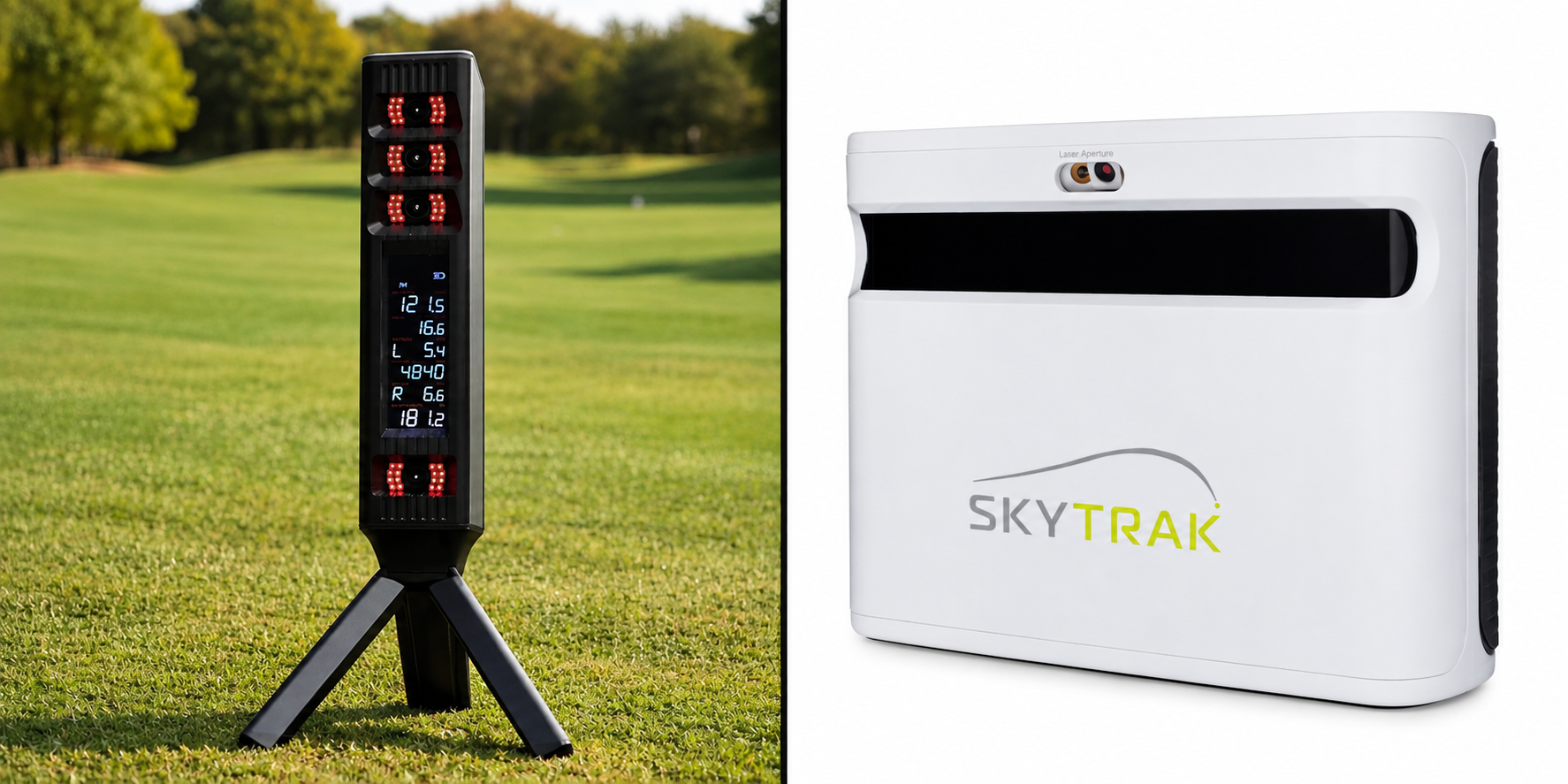
Square Golf Omni vs SkyTrak+ (2026): Which Fits Your Build?
If you want zero subscriptions and simple portability, the Square Golf Omni is usually the better fit. If you want a proven track record, polished software, and mature training tools, the SkyTrak+ is the safer buy.
Deciding on the Square Golf Omni vs SkyTrak+ comes down to space, software compatibility, accuracy, and 3-year cost. Here is how they compare so you can choose the right unit in two minutes.
Accuracy: Driver, Iron, and Club Data Compared
Accuracy issues in a home launch monitor are rarely evenly distributed. A unit can track 7-iron carry within two yards of a commercial reference but still mislead you on driver spin or push offline ball flights the wrong way. In the Square Golf Omni vs SkyTrak+ matchup, accuracy comes down to hardware maturity versus raw data upside.
The Square Golf Omni brings aggressive high-speed camera hardware to the budget tier. In independent testing against GCQuad-class reference units, its core ball metrics (ball speed, launch angle, total spin, and carry distance) tracked remarkably close on clean iron strikes.
The tradeoff lies in the club data workflow and firmware maturity. To capture Omni's expanded club metrics, you have to apply reflective stickers to the clubface and a tracking band near the hosel. That prep work delivers detailed face-to-path and attack angle numbers, but it creates real friction when swapping clubs or hosting guests. Early testing also revealed directional quirks, specifically an offline mismatch for left-handed golfers. As covered in our Square Golf Omni review, this is a firmware maturity issue rather than broken hardware, but it remains an early-adopter risk.
The SkyTrak+ takes a more established approach. By combining photometric high-speed cameras with built-in Doppler radar, it delivers proven indoor shot shaping without requiring club stickers for basic path and clubhead speed. With years of algorithmic tuning behind it, you run into far fewer unexplained phantom curves or misread ball flights.
The catch with the SkyTrak+ is hitting zone discipline. Because it relies heavily on photometric cameras reading a tight optical window, sloppy ball placement outside the laser dot leads to no-reads or inconsistent launch angles.
The accuracy mini-conclusion: If you are a right-handed golfer who wants deep club metrics per dollar and does not mind club stickers or early firmware updates, the Omni offers higher data upside. If you want sticker-free convenience, proven indoor reliability, and fewer weird-shot anomalies, the SkyTrak+ is the safer accuracy bet.
Space Requirements and Hitting Zone: How Much Room Each Needs
The best launch monitor on paper is worthless if it does not fit your room or makes every practice session frustrating with finicky ball alignment. In the Square Golf Omni vs SkyTrak+ matchup, space math and daily usability on the mat are critical deciding factors.
Because both units sit beside the hitting area rather than behind you, they eliminate the 6 to 8 feet of rear tracking clearance demanded by radar units. You only need safe swing clearance and 8 to 10 feet of ball flight into your impact screen. Running your golf simulator room size math shows that both devices comfortably operate in rooms roughly 12 to 14 feet deep, making them ideal for standard garage bays and finished basements.
Where they separate immediately is the ball-placement reality on the mat.
The Square Golf Omni provides a generous hitting zone of roughly 10 inches by 10 inches. For casual golfers, high handicappers, or practice sessions with varied turf positions, this larger capture box means you simply drop a ball down and swing. You spend less time adjusting ball placement and more time hitting shots.
The SkyTrak+ requires much tighter setup discipline. It projects a red laser dot onto your hitting surface, and the ball must sit directly on or within a tight two-inch radius of that point. Stray outside that optical window and you risk missed shots or no-reads. For structured solo practice that precision is manageable, but for rapid-fire range sessions or less experienced players, the constant alignment can feel tedious.
Both devices share one key physical drawback: side-mounted floor placement makes mixed left-handed and right-handed sessions cumbersome. Switching between players requires physically picking up the unit, moving it across the hitting strip, and re-leveling the alignment.
The space and usability mini-conclusion: If you want a forgiving hitting zone and hate ball-on-the-dot placement stress, the Omni delivers the friendlier daily experience. If you do not mind precise ball placement on a laser dot in exchange for established indoor reliability, the SkyTrak+ remains the safer choice for dedicated indoor bays.
Software Compatibility: GSPro, E6 Connect, and Native Apps
The foundational rule of building a home simulator is simple: choose your software first, then buy the launch monitor that supports it. Buying hardware before confirming compatibility with your target platform is the fastest path to post-purchase regret.
The Square Golf Omni functions primarily as a budget-friendly hardware play that leans on external software for premium course simulation. For quick training, its on-unit display gives you instant shot numbers without waking up a PC or tablet, which is a major convenience for 15-minute range work. However, connecting the Omni to GSPro relies on an API connector bridge rather than a native integration. If you are an iPad or Mac user, you cannot run GSPro at all, leaving you boxed into basic mobile practice apps unless you purchase a Windows machine.
The SkyTrak+ delivers a more mature, turnkey software ecosystem. Its native application provides polished driving ranges, skills assessments, and bag mapping that run smoothly across iOS, Android, and PC. For full course simulation, SkyTrak+ features official native integration with E6 Connect, eliminating the need for community connector scripts. While GSPro remains a popular community pairing for SkyTrak+, unlocking third-party data transmission requires an active SkyTrak software subscription tier.
Simulation platforms also carry hidden computing costs. You can check our complete guide on what launch monitors work with GSPro to evaluate connection stability across both units. Running GSPro or PC-based E6 Connect requires a Windows computer with a dedicated GPU, which adds roughly $800 to $1,200 to your total build cost if you do not already own one.
The software mini-conclusion: If you already own a capable gaming PC and want the most affordable hardware path into GSPro via an API bridge, the Omni delivers strong value. If you want a polished iPad workflow, native E6 Connect course play, or structured practice software without building a gaming computer around it, the SkyTrak+ is the better fit.
Total Cost of Ownership: 3-Year Math and Hidden Expenses
Most home simulator buyers do not regret the upfront hardware purchase. They regret the recurring subscriptions, extra software fees, and computing hardware they forgot to budget for. When evaluating the Square Golf Omni vs SkyTrak+, looking at a three-year cash-out calculation reveals a completely different financial picture than comparing launch monitor price tags alone.
The SkyTrak+ carries a higher baseline investment. As of 2026, new units are no longer sold directly, meaning Certified Pre-Owned (CPO) is the primary purchase route from SkyTrak (always verify current pricing and warranty coverage before buying). Beyond hardware, unlocking full software access, bag mapping, and third-party connectivity requires a $19.99 per month subscription, adding roughly $720 over three years. If you plan to leave the mobile app and run PC-based simulation, budget another $800 to $1,200 for a dedicated gaming computer.
The Square Golf Omni is built around a zero-subscription model. Out of the box, you pay no ongoing platform fees to use the on-unit display or standard practice app. If you decide to add simulation through GSPro, budget approximately $250 per year ($750 over three years) for the software license.
The hidden cost on the Omni is workflow friction and consumables. Capturing full club data requires reflective club stickers and tracking bands. While replacement dots cost very little, replacing worn stickers across your bag is an ongoing maintenance chore.
If you are mapping out a complete build with an impact screen, projector, and enclosure, consult our full golf simulator cost breakdown to budget accurately across every component.
The cost mini-conclusion: If you are subscription-averse and want the lowest predictable three-year spend, the Square Golf Omni easily wins the math. If you are willing to pay ongoing fees to get a turnkey, sticker-free training ecosystem that works seamlessly on an iPad, the SkyTrak+ justifies its higher total cost.
Daily Usability: Setup Time, Connection Stability, and Portability
Two launch monitors can post similar numbers on a spec sheet but feel completely different when you power them on for a quick 20-minute session on a Tuesday night. Daily ownership comes down to shot-to-screen delay, connection stability, and how much friction stands between walking into your hitting bay and striking your first ball.
The Square Golf Omni shines on shot speed and hardware versatility. Community testing consistently notes near-instant ball-to-screen responsiveness with minimal shot delay. Its built-in lithium battery and top-mounted display make it genuinely portable. You can drop it into a bag, head to the driving range, and get immediate numbers on the unit without pairing a phone or hauling a tablet along.
The catch with the Omni is early-generation connection stability. Early adopters report occasional Bluetooth drops and Wi-Fi handoff hiccups during extended simulator sessions. Dialing in a reliable connection requires good network hygiene, strong Wi-Fi near your hitting bay, and staying current on regular firmware updates.
The SkyTrak+ delivers a much more mature daily software routine. While it lacks an integrated screen and requires an external device, its native app ecosystem is where owners find long-term value. Features like bag mapping, target practice, and the built-in wedge matrix make structured practice intuitive without needing third-party add-ons.
Where the SkyTrak+ introduces daily friction is setup discipline on the mat. Because its optical hitting window is confined to a tight laser dot, beginners often face a longer time-to-first-shot while learning precise ball placement. Following a proper SkyTrak+ setup guide to get height and leveling dialed in is critical to avoid missed reads.
The usability mini-conclusion: If you prioritize grab-and-go portability, immediate shot trigger times, and outdoor practice without an iPad, the Omni offers a faster day-to-day routine once your network is stable. If you want a proven training ecosystem with deep practice modes and fewer early product quirks, the SkyTrak+ is the more finished product.
The Verdict: Square Golf Omni vs SkyTrak+
Both the Square Golf Omni and SkyTrak+ solve the space problem for home builds by using side-mounted camera tracking that works in 12 to 14 feet of room depth. Where they split is ownership structure, software maturity, and early-adopter risk. The Omni is a budget camera unit with zero mandatory fees, while the SkyTrak+ is a proven, subscription-backed ecosystem.
Here is how to choose the right unit for your setup.
If You Want Zero Subscriptions and Range Portability: Square Golf Omni
Choose the Square Golf Omni if keeping long-term ownership costs low is your top priority. Out of the box, it delivers accurate ball data, zero annual platform fees, and a built-in display that lets you take it to the driving range without bringing a tablet.
Keep two qualifiers in mind. Capturing full club data requires applying reflective stickers to your clubs, and early firmware means accepting occasional connection quirks while the platform matures. If you are comfortable with that workflow, read our full Square Golf Omni Review before buying.
If You Want a Proven Training Ecosystem: SkyTrak+
Choose the SkyTrak+ if you want a polished, turnkey training system and do not want to manage club stickers. Its dual-camera and radar array measures clubhead speed and path cleanly on standard clubs, feeding into a refined native app with bag mapping and wedge matrix tools.
The tradeoffs are financial and operational. You must factor in the $19.99 monthly subscription to keep third-party connectivity and practice features active, and you will be buying through certified pre-owned channels as of 2026.
If You Are an iPad or Mac Household Without a PC: SkyTrak+
Choose the SkyTrak+ if you do not plan to buy a dedicated Windows gaming computer. The SkyTrak+ software runs natively across iOS and macOS, offering smooth iPad driving range sessions and turnkey E6 Connect integration.
The Omni can run simple mobile practice tools, but unlocking its full course simulation potential requires connecting to GSPro on a Windows PC with a dedicated graphics card.
If You Are a Left-Handed Golfer: SkyTrak+
If you are a left-handed golfer, steer toward the SkyTrak+. Early community testing on the Omni identified directional push-pull misreads for lefties that remain an early-adopter risk until fully addressed via firmware. If you still want the Omni, verify that recent software updates have resolved lefty tracking before committing. Both units require physical repositioning when switching between righties and lefties.
How to Make Your Final Call
- Pick your software first. Decide between GSPro, E6 Connect, or native practice apps to see which virtual courses fit your routine.
- Verify your physical space. Confirm your hitting bay has at least 12 feet of depth and sufficient width to center a side-mounted unit.
- Run the 3-year total cost. Add hardware, subscriptions, and any PC upgrades to know your true out-of-pocket investment before buying.
Frequently Asked Questions
Which is more accurate, the Square Golf Omni or SkyTrak+?
The SkyTrak+ is more reliable overall, though the Omni closely matches it on baseline ball metrics. The SkyTrak+ delivers consistent indoor ball and club data without strange shot-shaping anomalies. The Omni produces accurate ball speed, launch, and spin on clean iron strikes, but capturing club metrics requires clubface stickers, and early firmware showed directional push-pull misreads, particularly for left-handed swings.
Do the Square Golf Omni and SkyTrak+ work with GSPro?
Both launch monitors work with GSPro, but the connection method and software setup differ. The SkyTrak+ requires an active SkyTrak software subscription tier to transmit shot data to third-party platforms. The Square Golf Omni connects through an API bridge. Running GSPro with either monitor requires a Windows PC with a capable dedicated GPU rather than an iPad or Mac.
How much room depth do you need for each launch monitor?
You need roughly 12 to 14 feet of total room depth for either device. Because both units sit beside the hitting strip rather than behind the golfer, they eliminate the 6 to 8 feet of rear tracking clearance required by floor radar units. You only need safe swing clearance behind you and 8 to 10 feet of ball flight into your impact screen.
Do you need special golf balls or club stickers?
Neither monitor requires proprietary marked golf balls for standard ball tracking, but club data requirements differ. The Square Golf Omni requires reflective face stickers and a hosel band to capture club path, face angle, and attack angle. The SkyTrak+ tracks club speed and path without stickers, but it demands precise ball placement directly on its optical laser dot.
Is the SkyTrak+ only Certified Pre-Owned in 2026?
Yes, direct purchases from SkyTrak are primarily Certified Pre-Owned (CPO) units in 2026. This is standard product lifecycle management rather than a reason for concern. Factory CPO units are fully inspected, tested, and backed by manufacturer warranty coverage, though stock availability and pricing can fluctuate more than traditional retail hardware.
Which launch monitor is better for left-handed golfers?
The SkyTrak+ is currently the safer choice for left-handed players. Early community testing on the Omni identified left-handed directional tracking issues where offline ball flight drifted opposite of actual strike mechanics. Lefties should verify recent firmware improvements before buying an Omni. Keep in mind that both units sit on the floor and must be physically moved when switching between left- and right-handed golfers.
Related Guides
Best New Launch Monitors of 2026: What Actually Shipped
Discover the best new launch monitors 2026 has to offer. Compare real shipping units by space requirements, 3-year costs, and simulator software compatibility.
BenQ AK700ST vs Optoma GT2400HDR (2026): Best Golf Projector?
Comparing BenQ AK700ST vs Optoma GT2400HDR? Discover throw ratios, 4K vs 1080p clarity, latency, and costs to choose the best golf simulator projector.
Square Golf Omni vs Rapsodo MLM2PRO (2026): Best Budget Pick?
Comparing the Square Golf Omni vs Rapsodo MLM2PRO? Compare indoor accuracy, room depth needs, and 3-year costs to choose the best launch monitor for your sim.