
Square Golf Omni Review (2026): The Budget Indoor/Outdoor Camera Unit

Square Golf Omni Review (2026): Is It Worth It?
If you are outfitting a tight space on a budget, you are likely weighing the Omni against subscription-heavy rivals. This Square Golf Omni review breaks down whether a subscription-free photometric monitor actually delivers.
Indoor and outdoor versatility without an annual fee sounds ideal, but real-world tradeoffs lurk in lighting sensitivity, club stickers, and firmware stability. Here, good enough accuracy means dependable carry numbers for garage play, not fitting-bay perfection.
Accuracy decides the buy, making it the first test.
Square Golf Omni Accuracy: Irons, Driver, and Short Game
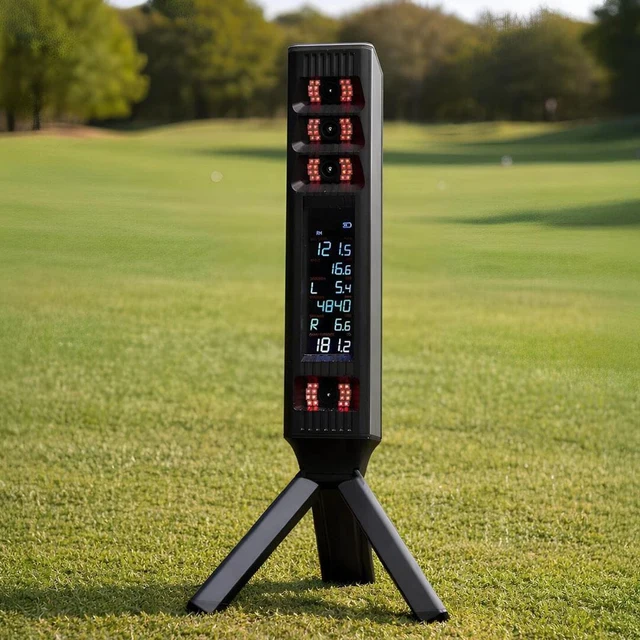
If a launch monitor misreads ball speed, backspin, and spin axis, the rest of the feature list is irrelevant. As a multi-camera photometric system, the Square Golf Omni captures high-speed impact photos instead of tracking ball flight downrange over 10 to 12 feet like radar units do. That makes it inherently better suited for short indoor setups where ball flight is limited.
Performance by Club Type
- Irons and Wedges: Head-to-head testing shows repeatable numbers through the bag. Ball speed, launch angle, and spin produce tight carry bands that line up closely against units like the SkyTrak+. Clean strikes show believable stopping power.
- Driver: Ball speed and launch stay reliable on center hits above 150 mph ball speed. Like most budget photometric systems, spin axis stability wavers on severe mishits. Big toe hooks or low-heel slices can trigger erratic horizontal offline numbers.
- Chipping and Putting: Sub-$2,000 monitors rarely master the short game, and the Omni is no exception. Data is usable rather than tour-grade. It reads start direction and launch angle well enough for casual simulator rounds, but it cannot model micro-rolls or delicate flop shots.
10-Minute Verification Routine
Before trusting the unit for winter practice, run this 20-shot checklist in your space:
- Hit 10 stock 7-irons: Check ball speed and carry distance against your known on-course baselines.
- Hit 5 intentional shapes: Verify spin axis tilts correctly on deliberate draws and fades rather than flipping randomly.
- Hit 5 half-wedges: Track camera read rates and watch for missed low-speed pitches.
The Bottom Line on Accuracy: Solid ball data on standard swings is the primary selling point in this Square Golf Omni review. However, third-party benchmark data against reference units like a GCQuad remains sparse. Treat single-session reviewer claims of "within three yards" as directional guidance rather than laboratory proof.
Real-World Tradeoffs: Lighting Sensitivity, Lefties, and Connection Drops
The Omni is marketed for indoor and outdoor play, but photometric cameras are not equally happy in every lighting setup. In this Square Golf Omni review, controlled garage bays performed reliably, but real-world conditions introduce specific failure modes you need to plan for before buying.
Lighting Sensitivity
Optical cameras rely on high-contrast frames to track ball markings and club delivery. The primary outdoor failure mode is patchy shade. Dappled sunlight through tree branches or shifting cloud cover confuses the high-speed sensors, resulting in no-reads, missed impact locations, or dropped spin calculations.
You can manage this with three setup rules:
- Match the light zones: Keep the unit and the ball in identical lighting. Both in full sun or both in full shade works. Splitting them between light and shadow causes misreads.
- Eliminate shadow flicker: Avoid hitting under tree canopies where moving leaf shadows cross the sensor window.
- Add overhead lumens indoors: If your garage bay is dim, the cameras produce noisy frames. An inexpensive overhead LED spotlight over the hitting strip stabilizes indoor tracking.
Left-Handed Players and Mixed Sessions
Early user reports on r/GolfSimulators flagged detection issues and erratic horizontal launch angles during left-handed play or rapid player switching. Treat this as an ongoing firmware risk rather than a solved problem. If you host mixed-handed simulator nights, confirm current firmware performance in the forums before buying.
Connectivity and Firmware Risks
During 18-hole rounds on GSPro, a dropped PC connection halts play immediately. An occasional manual reconnect between holes is tolerable, but frequent drops quickly ruin a group session. Additionally, only install firmware updates delivered through the official mobile app. Never manually flash third-party firmware files, because bricked budget units rarely have recovery tools.
The Tradeoff Verdict: The hardware value is legitimate, but if your main plan is hitting outside under shifting afternoon sun, expect lighting misreads to be your primary headache.
Software and Setup: Courses, Compatibility, and Daily Alignment
Always decide on your simulation software first, then verify the launch monitor supports that path without friction. For any Square Golf Omni review, software compatibility is where real ownership costs emerge.
The native Square Golf app gives you driving ranges, skill challenges, and practice modes with zero recurring subscription fees. However, playing full 18-hole virtual courses inside the native ecosystem relies on a credit-based model. You spend digital credits per round. If you play solo once every two weeks, included credits last months, but hosting regular four-player weekend matches turns that pay-as-you-play structure into an unwelcome ongoing expense.
If you want unlimited course play, you must look toward third-party software. When comparing GSPro vs E6 Connect, remember computing requirements differ completely. GSPro requires a dedicated Windows gaming PC with an independent GPU. Connecting the Omni to GSPro relies on an open connector over Bluetooth or Wi-Fi, which runs stable once dialed in, though occasional drops require restarting the bridge.
If you do not want to spend $800 or more on a gaming PC, E6 Connect and Awesome Golf run natively on iPads and tablets. Both offer simpler, family-friendly interfaces that bypass PC troubleshooting entirely.
Physical setup also demands discipline. Because the photometric Omni sits adjacent to the ball, alignment dictates accuracy. The hitting zone is roughly 8 by 10 inches, requiring alignment parallel to your target line using the built-in guide marks. If you nudge the unit or shift your mat, your horizontal launch angles will skew until you re-level and re-aim.
The Software Verdict: The Omni avoids mandatory hardware subscriptions, which is a genuine advantage over competitors. Just do not confuse subscription-free hardware with zero-cost software if your ultimate goal is playing high-end virtual courses.
Space Requirements: Basement and Garage Bay Dimensions
For tight builds, the Square Golf Omni sits in the right technology lane. Because it relies on photometric cameras reading impact, it does not need open flight downrange to calculate ball speed and spin. That cuts substantial room depth compared to floor-mounted radar units.
The Real-World Room Math
Dialing in your golf simulator room size requires three concrete measurements:
- Depth: Total depth combines backswing space, ball-to-screen distance, and screen buffer. Radar units demand 16 to 18 feet because the sensor sits 7 to 8 feet behind the ball. Because the Omni sits beside the tee, you can build a safe setup in 12 to 14 feet of total room depth.
- Ceiling Height: No monitor fixes a low ceiling. Clearance depends on golfer height, swing path, and club length. An 8.5-foot ceiling may clear irons for a shorter golfer, but driver swings realistically demand 9.5 to 10 feet. Always test full swings with your longest club first.
- Width: Side-mounted placement requires room for the unit footprint, your stance, and safe shank margins. Budget at least 10 feet of width for offset hitting, or 12 to 14 feet to hit centered.
Hitting Zone Usability
The Omni offers a 10-inch by 10-inch hitting zone, giving you enough room to tee a driver without millimeter alignment. If you strike outside the box, the cameras register a clean no-read rather than bad data. Note that dim basements can hurt optical read rates; add an inexpensive spotlight directly above the mat to keep tracking reliable.
The Space Verdict: If room depth is capped at 12 to 13 feet, the Omni fits where radar physically cannot. If low ceiling height is your bottleneck, no hardware fixes that, and you must plan around iron-only play.
Total Cost of Ownership: 3-Year Realities Beyond the Sticker Price
The most common budget mistake in home sim golf is assuming sticker price equals total cost. At roughly $700 MSRP, the Square Golf Omni requires zero mandatory hardware subscriptions. Even so, your computing hardware, software licenses, and consumables alter the true bottom line over three years.
Your actual outlay depends entirely on your chosen software route:
- Native Square-Only Route ($750 to $900 total): Omni hardware paired with a phone or tablet. Driving range practice costs nothing. If you play full virtual rounds, budget $50 to $150 across three years for credit top-ups, plus $30 for an adjustable tablet stand.
- The GSPro Path ($2,250 to $2,550 total): Omni hardware plus GSPro at $250 per year ($750 total). If you do not own a capable machine meeting golf simulator PC requirements, budget another $800 to $1,000 for an entry-level gaming desktop.
- The E6 or Awesome Golf Route ($1,050 to $1,600 total): Omni hardware paired with an Awesome Golf lifetime license ($349) or an E6 Connect subscription ($300 to $600 per year). Both run on an iPad you likely already own, avoiding PC upgrades.
Factor in small consumable expenses. Club tracking stickers wear out and peel, costing roughly $20 per year in replacements. If your hitting bay is dim, plan on a $25 overhead LED light to prevent missed reads. The long-term upside is that if you add an impact screen and projector later, the Omni preserves its value without forcing a hardware upgrade.
The Cost Verdict: The Omni offers an honest advantage by skipping mandatory device subscriptions and third-party connector fees. Just understand that building a full sim experience around it introduces software and PC costs that will easily exceed the price of the launch monitor over three years.
The Verdict: Is the Square Golf Omni Worth It?
The Square Golf Omni fills a distinct void in home sim golf by delivering photometric launch data at a radar price point with zero annual fees. It gives garage builders with tight room depth an indoor sensor that will not drain their budget year after year. Early firmware quirks, outdoor lighting sensitivity, and left-handed switching issues prove that eliminating subscriptions still involves real hardware compromises.
| Category | Judgment |
|---|---|
| Accuracy | Good. Iron, wedge, and ball speed data are dependable; driver spin axis wavers on off-center hits. |
| Reliability | Fair. Sensitive to patchy outdoor lighting, occasional connection drops, and ongoing lefty firmware quirks. |
| Software & Compatibility | Strong flexibility. Subscription-free driving range, third-party support for GSPro, E6 Connect, and Awesome Golf. |
| Space Fit | Excellent. Side-mounted optical cameras need only 12 to 14 feet of total room depth. |
| Total Cost (3-Year) | Outstanding value. At roughly $700 with zero mandatory subscription fees, long-term costs stay flat. |
Who It Is For
- The budget-conscious first-timer: If you want measured ball flight into a net without paying an ongoing $100 to $250 annual fee, the Omni is the most economical optical entry point available.
- The space-constrained garage builder: If your room depth stops at 12 to 14 feet, floor-mounted radar units cannot function properly. The Omni sits beside the ball, protecting your limited floor space.
- The dual-location golfer with controlled light: If you split practice between an indoor net and a covered range bay with steady lighting, the small footprint travels easily.
Who It Is Not For
- The mixed-light outdoor player: If you practice in dappled sunlight under trees or shifting cloud cover, optical read errors will test your patience.
- Left-handed or mixed-handed households: Firmware support for lefties and rapid stance switching remains unpredictable. Check community forums to verify recent patch stability before buying for mixed-handed groups.
- The zero-friction seeker: If you want hardware that connects instantly without resetting Bluetooth drops or tweaking connector tools, pay up for an established platform.
Alternatives at a Glance
If you want a dedicated indoor optical setup with mature software and seamless right-and-left play, look at a certified pre-owned SkyTrak+. If you practice primarily outdoors or have at least 16 feet of total room depth, radar units like the Garmin R10 or the picks in our Square Golf Omni vs Rapsodo MLM2PRO breakdown offer better direct-sunlight reliability.
If your room dimensions are tight and you fit the target profiles above, the Omni is a rational purchase. If your space or use case matches the known pain points, do not talk yourself into it hoping future firmware updates will change the physics of budget camera tracking.
Frequently Asked Questions
Is the Square Golf Omni worth it in 2026?
The Square Golf Omni is worth it if you need an affordable indoor launch monitor for a shallow room and refuse to pay recurring device subscriptions. It delivers dependable iron and ball speed numbers in rooms with only 12 to 14 feet of total depth. However, it is not worth it if you want zero-friction software, host regular left-handed golfers, or plan to hit outside under patchy shade where optical cameras struggle.
What is the Square Golf Omni price, and what do you actually pay over 3 years?
The Square Golf Omni retails for roughly $700, but your true three-year cost ranges between $750 and $2,550 depending on software. Using only native driving ranges on an iPad costs virtually nothing beyond the hardware. Stepping up to GSPro adds $250 annually for the license, plus an $800 to $1,000 Windows gaming PC if you do not already own one.
Does the Square Golf Omni require a subscription?
No, the Square Golf Omni does not require a mandatory hardware subscription to unlock your data. Basic practice modes and driving ranges remain permanently free in the native app. However, full 18-hole virtual rounds inside Square's software use a pay-per-play credit model. If you switch to third-party simulation tools like GSPro or E6 Connect, you pay those providers directly for their software licenses.
Does the Square Golf Omni work with GSPro and E6 Connect?
Yes, the Square Golf Omni connects to both GSPro and E6 Connect, though the computing requirements differ. E6 Connect runs natively on iOS and PC. GSPro requires a dedicated Windows gaming PC and uses an open connector bridge over Bluetooth or Wi-Fi. If you plan to build around PC simulation, review how to set up GSPro to verify hardware specs and network steps before buying.
Can I use the Square Golf Omni outdoors in bright sun?
You can use the Omni outdoors, but performance depends entirely on uniform lighting across the hitting area. The optical cameras track ball markings accurately in full, direct sunlight or deep shade. The primary failure mode is dappled sunlight through tree branches or moving cloud cover, which blinds the sensors and triggers missed reads. Keep both the ball and the device in identical light.
Is the Square Golf Omni better than a SkyTrak or SkyTrak+ for a small room?
The Omni is better if you want to avoid annual fees on a strict budget, but the SkyTrak+ offers superior software maturity and seamless left-and-right play. Both camera-based units fit small rooms requiring only 12 to 14 feet of depth. While the Omni saves cash upfront, a certified pre-owned SkyTrak+ provides a far more polished indoor experience without early firmware quirks.
Related Guides
Bullseye 3D Golf Mat Review (2026): The New Budget Divot-Feel Mat
Read our Bullseye 3D golf mat review to see how it handles joint shock, launch monitor accuracy, and long-term durability. Learn if it fits your sim setup.
Uneekor EYE XR Review (2026): Overhead Launch Monitor for Home Sims
Read our honest Uneekor EYE XR review covering accuracy, room space requirements, GSPro costs, and whether this overhead launch monitor fits your home setup.
Rapsodo CLMPRO: First Look at the Overhead Six-Camera Launch Monitor
Wondering if the Rapsodo CLMPRO is worth waiting for? Explore confirmed prototype specs, ceiling clearance needs, GSPro compatibility, and ownership costs.